Skip to content

TAX FORMS · IRS · BUILT IN

Fill Form 1040-X with AIAmended U.S. Individual Income Tax Return

Add the original return, the corrected forms, the client’s email and your worksheet. Fyllyo fills Form 1040-X on your Mac. Any amount the documents disagree on is left for you, with the reason.

Fyllyo fills the Rev. February 2024, for amending 2024 returns. Official form and instructions from the IRS.

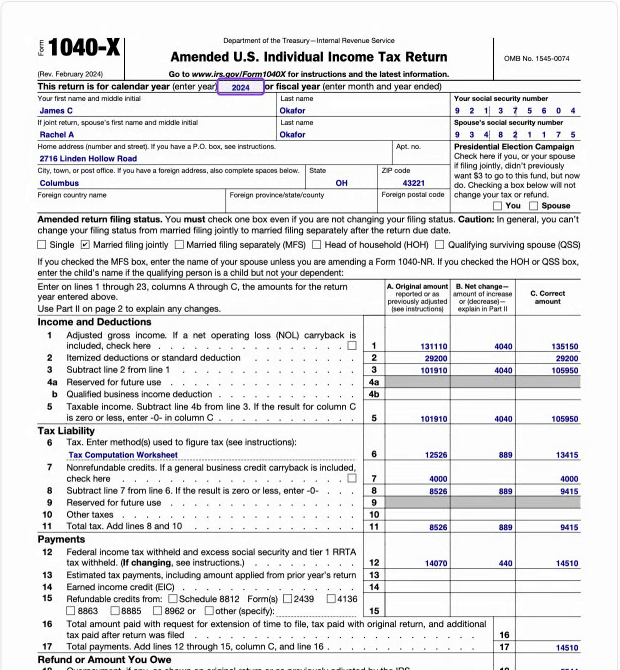
Page 1 of Form 1040-X as Fyllyo filled it for a test client, James and Rachel Okafor: the 2024 tax year, names, address and filing status, with original, net change and corrected amounts on each income and tax line.
Page 1 of Form 1040-X, as Fyllyo filled it for a test client

Where AI form filling goes wrong on Form 1040-X

Most of Form 1040-X is three columns of numbers: the original return, the change and the corrected amount. The documents behind them rarely agree line by line, and the totals depend on each other. These are the common places AI tools and autofill get it wrong. What the form requires is for the IRS to say. Follow its instructions. IRS instructions for Form 1040-X.

Columns that don’t add up

A worksheet or email can give both a net change and a corrected amount, and a typo can make them disagree. Software that copies both can fill a line where the original plus the change isn’t the corrected amount, and every total below it inherits the error.

“Previously reported” taken as the original amount

A W-2c shows “previously reported” and “correct” amounts for one employer. Software can copy the previously reported figure into the original-amount column, though the original return combined every W-2.

Sums done by guesswork

Form 1040-X has a dozen lines that are sums or differences of other lines. A language model asked for the totals can get the arithmetic wrong, or copy a total from a worksheet that has its own mistake.

Payments counted twice

The same payment can show up on the original return, in the client’s email and on a worksheet. Software can count an estimated payment as tax paid with the return too.

Masked Social Security numbers

Return copies and W-2s often show an SSN as XXX-XX-6218. Copied into the form, that’s an invalid number in a required box.

Dependents copied from the original return

The original return’s list of dependents looks like an answer to copy, but Part I of Form 1040-X is about dependents being added or removed.

Last year’s IP PIN

The original return shows the Identity Protection PIN used that year. The IRS issues a new one every year, so a PIN copied from the old return can be the wrong one.

How Fyllyo takes care of them

With a test client and four documents (the 2024 return as filed, a W-2c, the client’s email and the preparer’s worksheet, which had one transposed number), Fyllyo filled 46 fields in 27 seconds. It left 8 for the preparer, each with the reason.

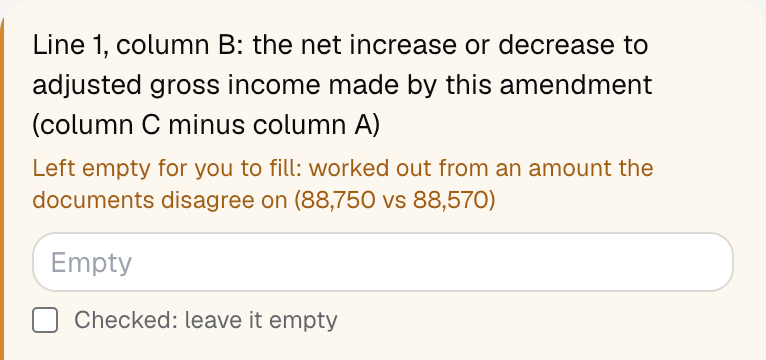
Fyllyo's review of a test Form 1040-X: line 1, column B left empty for the preparer, with the note that it is worked out from an amount the documents disagree on, 88,750 vs 88,570.
  • Columns that don’t add up. Compares the corrected amount with the original plus the change. When they disagree, it leaves that line, and the lines worked out from it, empty and shows both amounts.
  • “Previously reported” taken as the original amount. Reads the original amounts only from the copy of the filed return, never from corrected forms.
  • Sums done by guesswork. Reads only the amounts the documents state and works out column B and every total itself, the same way each time.
  • Payments counted twice. Sorts each payment by what it was for, so an estimated payment is counted once.
  • Masked Social Security numbers. Never fills a masked number. The box is left for you, with the reason.
  • Dependents copied from the original return. Fills the dependents part only when a document adds or removes a dependent, and tells you what it kept off the form.
  • Last year’s IP PIN. Uses the current IP PIN when a document gives it, not one printed on an older return.

Watch it fill a 1040-X

A test client’s 2024 amendment, from four documents. Fyllyo fills 46 fields in under a minute and leaves the one amount the documents disagree on for the preparer. Then the form is saved and signed.

Read what the video shows
  1. Fyllyo fills PDF forms from your documents, on your Mac.
  2. Pick the form…
  3. …name the case…
  4. …and add everything the client sent: the return as filed, a W-2c, their email and your worksheet.
  5. Fyllyo reads them on this Mac. Nothing is uploaded. (Sped up 8×.)
  6. Done. Every answer shows the line in the documents it came from.
  7. Check the key facts as you go.
  8. Where the documents disagree, Fyllyo leaves the field empty and says why.
  9. You make the call.
  10. Save the filled PDF. It never left this computer.
  11. Every PDF tool is free: edit text, redact, recognize scans, sign…
  12. …like signing with your own certificate.
  13. Form not built in? Add any fillable PDF, and Fyllyo learns it.
  14. Fyllyo. AI form filling: $99 once. Every PDF tool: free. fyllyo.com, for Mac.

How much of a Form 1040-X does Fyllyo fill?

Fyllyo fills 126 of the 127 fields on Form 1040-X from the client’s documents. Lines the documents don’t support stay blank and are listed for you to check.

You do

  • The Part II explanation of changes, in your words
  • Signing the return

You confirm on every form

  • The tax year being amended
  • The taxpayer’s name and social security number
  • Corrected adjusted gross income (line 1, column C)
  • Corrected tax (line 6, column C)
  • The amount owed or overpaid (lines 20 and 21)

What do you give Fyllyo?

Fyllyo reads the documents you already have. These can be PDFs, scans, photos, Word files or typed notes, and you can add several at once. Fyllyo works out which document answers which line.

Client data stays on your Mac

Client documents and the filled form never leave your computer. Fyllyo uploads nothing. Once it is set up, filling works offline.

What Fyllyo doesn’t do

Fyllyo doesn’t decide whether a return should be amended, give tax advice or e-file. Use the IRS’s instructions for Form 1040-X and your professional judgement. Fyllyo does the reading and the typing.

Can Fyllyo fill a 1040-X for an earlier year?

The built-in form is the February 2024 revision, for amending 2024 returns. For another year, add that year’s fillable 1040-X from the IRS as your own form. You set it up once, then fill it like this one. Set up that fillable PDF as your own form →

What if a document is a scan or a photo?

Fyllyo reads scans and photos as well as PDFs, Word files and typed notes. Clear, readable copies give the best results, and every answer still shows the line it came from.

Fill your next Form 1040-X on your Mac

Try form filling free for 5 days. Then buy Fyllyo Paid once for $99. It is a lifetime licence with free updates and no subscription. Filling forms on your Mac uses no AI credits. Pricing and licence details.