 fyllyo
Why Preview shows “Please wait…”
XFA is an older Adobe format that builds the form when it opens. Preview and browsers don’t support it, so they show the placeholder page instead.
“If this message is not eventually replaced by the proper contents of the document, your PDF viewer may not be able to display this type of document.” That’s an XFA form. Preview and web browsers can’t show them. Fyllyo opens and fills them.
Part of Fyllyo Paid, $99 once · Free 5-day trial with an account, no card · Apple silicon, macOS 13 or later
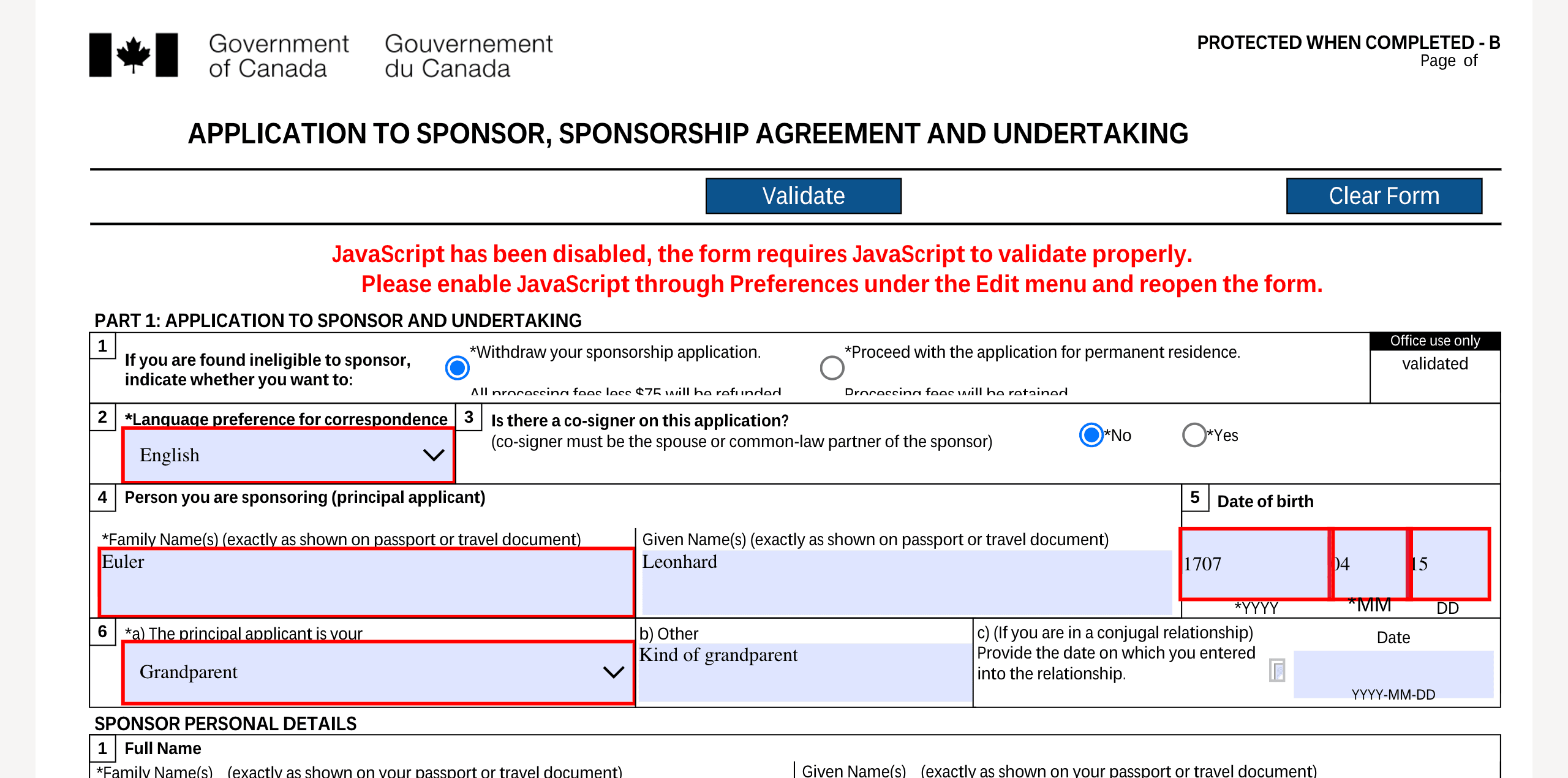
Download the PDF instead of opening it in your browser.
Drop it on Fyllyo’s Home screen, or choose Open. Fyllyo shows the real form, not the “Please wait…” page.
Type into the fields. Parts of the form that run its own scripts, such as adding rows or Validate, don’t work yet.
Save the filled form. It’s still an XFA form, so check it in Fyllyo or Adobe Reader, then upload or submit it as the office asks.
XFA is an older Adobe format that builds the form when it opens. Preview and browsers don’t support it, so they show the placeholder page instead.
Many immigration, tax and benefits forms are XFA, which is why they so often fail on a Mac.
Forms that show “Please wait…” need Fyllyo Paid, $99 once. Try it free for 5 days, with no credit card.
It’s an XFA form. Preview and web browsers can’t display XFA, so they show the placeholder page built into the file. Open it in an app that supports XFA, such as Fyllyo.
Yes. Fyllyo Paid opens and fills most XFA forms on a Mac, for $99 once instead of a subscription, and you can try it free for 5 days.
Check what the office asks for, such as printing the form or uploading it, and always review the filled form before you send it.
Not yet. Fyllyo shows and fills the form, but buttons that run the form’s own scripts, such as Validate or Clear Form, don’t run, and the form may say JavaScript is disabled. Check the form yourself before you submit it.
Forms that show “Please wait…” need Fyllyo Paid. Forms that also have ordinary fields open and fill for free.
Reading, filling in, drawn signatures, page tools, combining, splitting, text recognition and passwords are free. Fyllyo Paid adds filling forms from your documents with AI, redaction, certificate signing, text editing, smaller PDFs and XFA forms, for $99 once.