 fyllyo
Can ChatGPT fill out a PDF form?
Chat AI tools are good at reading and explaining. Filling a PDF form from your documents is a different job: every answer has to be right, in the right box, in the form’s format.
Can ChatGPT fill out a PDF form?
Partly. A chat AI tool such as ChatGPT can read a form and your documents and suggest answers, but your documents are uploaded to the provider, it can answer confidently when it isn’t sure, and you usually still type its answers into the PDF yourself. For filling the form’s fields from your documents, an AI form filler does the job directly; Fyllyo does it on your Mac, without uploading anything.
Chat AI, online AI form fillers and on-device filling compared
There are three common ways to fill a PDF form with AI. They differ most in where your documents go and in who makes sure the answers fit the form.
| What to compare | Chat AI tools | Online AI form fillers | Fyllyo, on your Mac |
|---|---|---|---|
| Where your documents go | Uploaded to the provider | Uploaded to the service | Stay on your Mac |
| Fills the PDF’s fields | Usually gives text you copy into the form | Yes | Yes |
| The form’s math and rules | Worked out in the chat, each time | Depends on the service | Formulas written and tested for each form |
| When it isn’t sure | Often answers anyway | Depends on the service | Leaves the field empty and says why |
| What you need | A browser and an account | A browser and an account | An Apple silicon Mac and a one-time model download |
| Cost | Free tier or a monthly plan | Plans or credits, for example Instafill’s | $99 once for AI filling |
Services vary and change. Check each one’s privacy and pricing pages before you rely on a row.
Where each approach fits
Chat AI: understanding the form
Chat AI is great at explaining what a form is asking, what a term means, or which documents a section seems to need. It is also good at drafting text, such as a short statement or a cover letter. For those jobs, chat AI is a good tool. Check anything it says about a form’s rules against the agency’s own instructions.
Online AI form fillers: convenience
Online fillers fill the PDF’s fields for you, in a browser, on any computer, with nothing to install. If your documents aren’t sensitive and you fill forms now and then, that convenience can be the right trade.
On-device filling: private documents and repeat forms
Filling on your own computer fits when the documents are passports, tax returns or client files you would rather not upload, and when you fill the same forms again and again. It needs a capable computer and a one-time setup. Read how filling without uploading works.
What goes wrong when AI fills a form
These problems show up across AI tools. They are about how the tool works, not about any one product.
- Your documents are uploaded. Cloud AI has to receive a copy of each document to read it.
- Confident answers when it isn’t sure. When two documents disagree, or a figure is missing, a language model often picks one and answers anyway. A pay stub shows one paycheck and a year-to-date total; read either one as annual income and the figure is wrong.
- You still type the answers in. A chat reply is text. Copying dozens of answers into the right boxes takes time, and every copied number is a chance for a mistake.
- No form rules. Forms have totals, conditions and formats. A model asked for a total can get the arithmetic wrong, or fill a section that doesn’t apply.
How Fyllyo handles those problems
Fyllyo’s AI only reads. Formulas decide. The AI reports what your documents say, and formulas written and tested for each form do the math, apply its conditions and format each answer.
- Local. The AI model and text recognition run on your Mac. Your documents and the filled PDF never leave it.
- A blank, not a guess. When Fyllyo isn’t sure, it leaves the field empty and says why, such as “the documents give two different amounts”.
- It fills the PDF’s fields. You get a filled PDF, with each answer shown beside the line in your documents it came from.
- The form’s rules. On Form I-864, Fyllyo works out how often the sponsor is paid from the pay dates and turns the paycheck into a yearly figure. It never uses a year-to-date total as annual income.
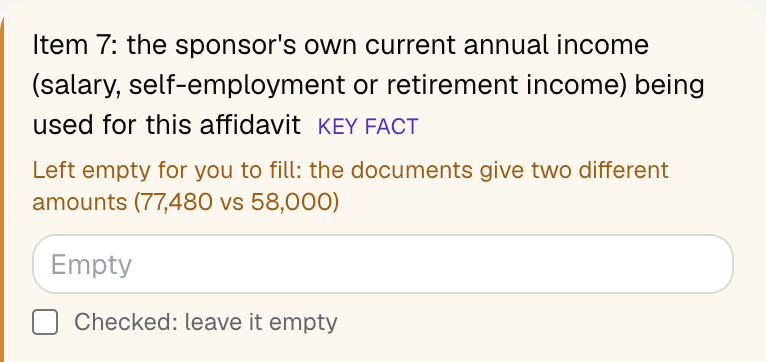
In that test, with seven documents, Fyllyo filled 54 fields of Form I-864 in 26 seconds and left 3 for the preparer, each with the reason. In a test of Form 1040-X with a test client and four documents, Fyllyo filled 46 fields in 27 seconds and left 8 for the preparer. One was a line worked out from an amount the documents disagreed on, 88,750 vs 88,570.
What Fyllyo doesn’t do
Fyllyo isn’t the right tool for every case. It runs on Apple silicon Macs only, with no Windows version. It fills fillable PDFs: scanned documents are fine as sources, but a scanned form with no fields isn’t supported. Setting up a form of your own is paid separately, with credits or your own AI provider key.
Fyllyo never submits or files anything, and gives no legal or tax advice. You review the filled PDF, then send it yourself.
See what Fyllyo’s AI form filler does. AI form filling is $99 once, with a free 5-day trial.