Skip to content

GOVERNMENT FORMS · SSA · BUILT IN

Fill Form SSA-44 with AIMedicare Income-Related Monthly Adjustment Amount - Life-Changing Event

Add the IRMAA notice, the tax return, the adviser’s projection and the records of the life-changing event. Fyllyo fills Form SSA-44 on your Mac. Anything it can’t confirm is left for you, with the reason.

Official form and instructions from the SSA.

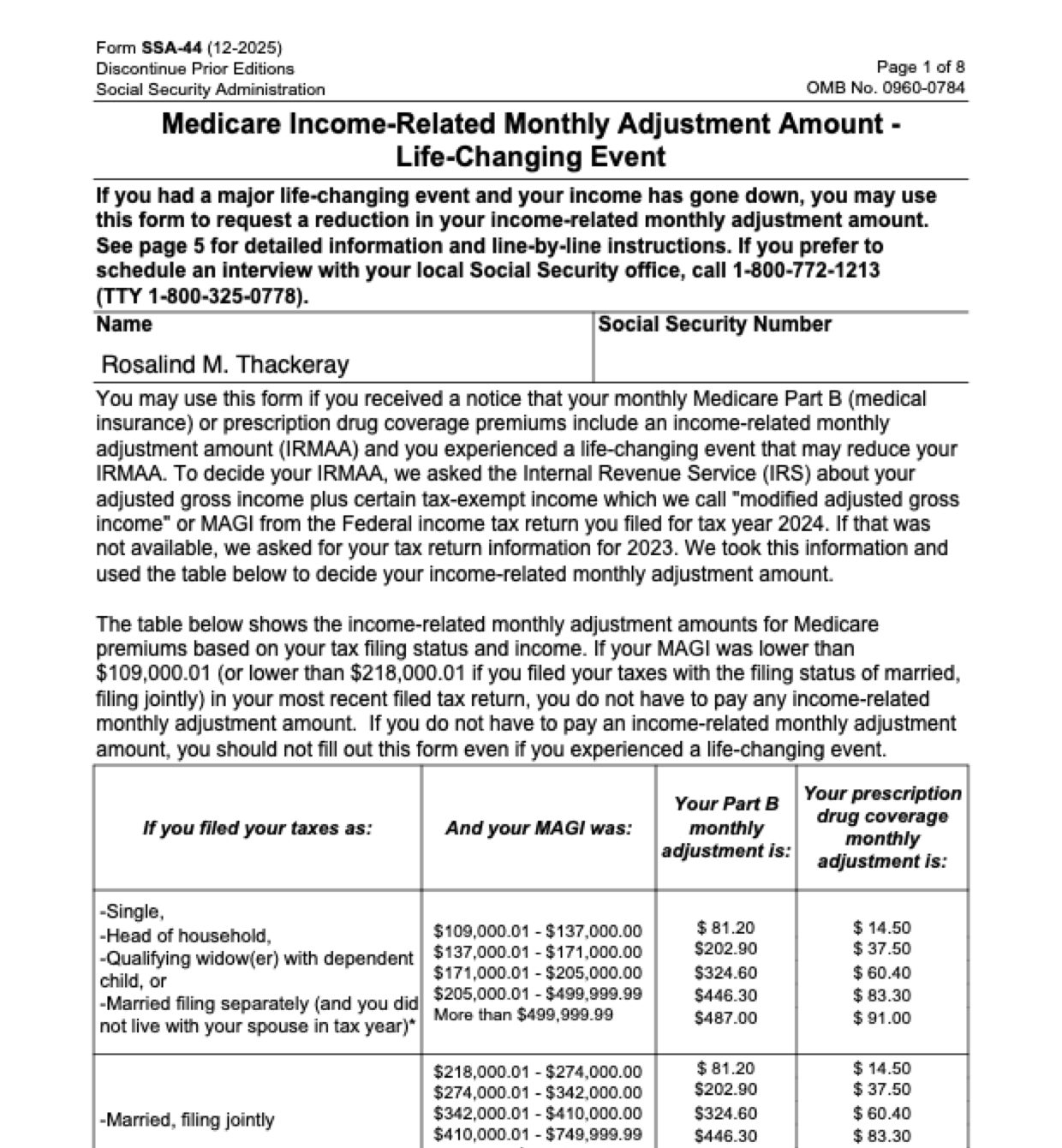
Page 1 of Form SSA-44 as Fyllyo filled it for a test client in a recorded run.
Page 1 of Form SSA-44, as Fyllyo filled it for a test client

Where AI form filling goes wrong on Form SSA-44

Form SSA-44 is short, but almost every amount on it appears in the documents more than once: for the year Social Security used, for the year income went down, and as an estimate for the year after. The notice, the return and an adviser’s projection all carry an AGI, an interest figure and a filing status, and software reading them can take the wrong year’s. These are the common places AI tools and autofill get it wrong. What the form requires is for the Social Security Administration to say. Follow its instructions. SSA instructions for Form SSA-44.

The year Social Security used, not the year income dropped

The premium notice states the older year’s income that Social Security used, and the newer return states the lower one. Software can copy the notice’s figures because they’re printed under the form’s own words.

AGI, not MAGI or total income

Returns and letters print total income, adjusted gross income and modified AGI within a few lines of each other. Software often takes the wrong one, or the MAGI that already includes the interest.

Tax-exempt and taxable interest side by side

A return lists tax-exempt and taxable interest on the same line, and a notice shows another year’s figure. Software can copy the larger taxable amount, or the older year’s.

A year box that already prints “20”

The tax year boxes print “20” and leave two spaces. Software that types the whole year writes “202025”.

Filing status from the wrong year

Filing status can change with a marriage, a divorce or a death, and the notice shows the old one. Software can copy the status printed on the notice.

Next year’s estimate on a form that doesn’t want it

An adviser’s projection for next year sits in the same file as the actual return. Step 3 is for when income next year will be lower still, as the form says. Software that fills every amount it finds adds an estimate that doesn’t belong.

Only the event this request is about

Client notes often mention old marriages and divorces as background. Software can tick every event it reads about, not just the one behind this request.

How Fyllyo takes care of them

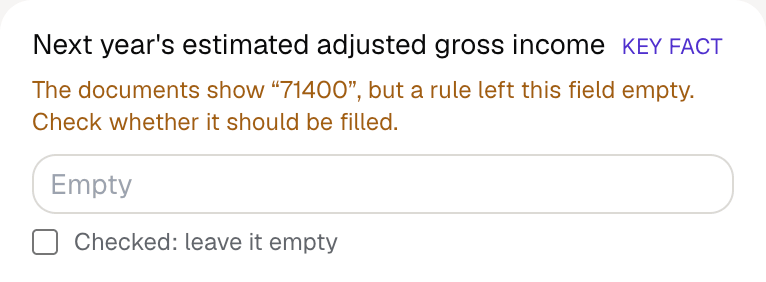
With a test client and five documents (an intake, the IRMAA notice, two tax returns and an adviser’s letter), Fyllyo filled 12 fields in 6 seconds. It kept next year’s estimate off the form and showed the preparer the amount it found.

Fyllyo's review of a test Form SSA-44: next year's estimated adjusted gross income left empty, with the note that the documents show 71400 but a rule left the field empty.
  • The year Social Security used, not the year income dropped. Fills Step 2 only from the return for the reduced-income year named in the documents. In the test, that was 68,900, not the 245,600 on the notice.
  • AGI, not MAGI or total income. Copies adjusted gross income as printed on the return, and the tax-exempt interest separately.
  • Tax-exempt and taxable interest side by side. Reads the tax-exempt interest from the same return as the AGI. In the test, that was 1,200, not the 3,450 of taxable interest.
  • A year box that already prints “20”. Writes only the last two digits of the year.
  • Filing status from the wrong year. Ticks the status stated on the return for the reduced-income year, and never works it out from marital status.
  • Next year’s estimate on a form that doesn’t want it. Fills next year’s estimate only when the documents say income will be lower next year. Otherwise it keeps the estimate off the form and shows you the amount.
  • Only the event this request is about. Ticks only the events the documents name for this request. In the test, that was work stoppage, and the earlier marriage and divorce were left off.

How much of a Form SSA-44 does Fyllyo fill?

Fyllyo fills 34 of the 35 fields on Form SSA-44 from the client’s documents. Lines the documents don’t support stay blank and are listed for you to check.

You do

  • Dates of life-changing events

You confirm on every form

  • Applicant's name
  • Applicant's Social Security number
  • Adjusted gross income for the reduced-income year
  • Tax-exempt interest for the reduced-income year
  • Next year's estimated adjusted gross income
  • and 1 more

What do you give Fyllyo?

Fyllyo reads the documents you already have. These can be PDFs, scans, photos, Word files or typed notes, and you can add several at once. Fyllyo works out which document answers which line.

Client data stays on your Mac

Client documents and the filled form never leave your computer. Fyllyo uploads nothing. Once it is set up, filling works offline.

What Fyllyo doesn’t do

Fyllyo doesn’t decide what to file, give legal or tax advice, or submit Form SSA-44 for you. Use the SSA’s instructions for Form SSA-44 and your professional judgement. Fyllyo does the reading and the typing.

What if a document is a scan or a photo?

Fyllyo reads scans and photos as well as PDFs, Word files and typed notes. Clear, readable copies give the best results, and every answer on Form SSA-44 still shows the line it came from.

Fill your next Form SSA-44 on your Mac

Try form filling free for 5 days. Then buy Fyllyo Paid once for $99. It is a lifetime licence with free updates and no subscription. Filling forms on your Mac uses no AI credits. Pricing and licence details.