 fyllyo
A 1099-K that mixes three kinds of payment
A payment app sends one Form 1099-K for everything: sales, money friends paid back, and personal things sold at a loss. Software often copies the gross amount into the space at the top of Schedule 1.
TAX FORMS · IRS · BUILT IN
Add the client’s 1099s, Schedule C, support records, deduction worksheets and the draft Form 1040. Fyllyo fills Schedule 1 on your Mac. Anything the documents disagree on is left for you, with the reason.
Schedule 1 gathers amounts from many documents, and most of them print more than one number: a gross and a net, a total and the part that counts, an amount paid and the amount deducted. Software that reads the first number it finds fills the wrong line, or the right line with the wrong amount. These are the common places AI tools and autofill get it wrong. What the form requires is for the IRS to say. Follow its instructions. IRS official page for Schedule 1 (Form 1040).
A payment app sends one Form 1099-K for everything: sales, money friends paid back, and personal things sold at a loss. Software often copies the gross amount into the space at the top of Schedule 1.
Schedule C shows a loss in parentheses, next to gross receipts and expenses. Software can drop the parentheses and add a loss as income, or copy the gross receipts.
Unemployment arrives with tax already withheld, and bank records show what was deposited. Software can copy the deposits instead of the compensation on the 1099-G.
A 1099-G shows the full state refund. Only part of it may be taxable, and the worksheet that works that out sits in another document. Software often copies the 1099-G figure.
One monthly payment often covers spousal support and child support, and the payment records show the total. Software can report all of it as alimony.
An HSA statement shows everything deposited, including the employer’s share, and a 1098-E shows all the interest paid. Software can copy those totals where the form asks for the deduction.
Schedule 1’s totals go to Form 1040, and the return in the file may have been drafted before a figure changed. Software that adds up the lines, or copies the return’s number, fills a total nobody reconciled.
With a test client and ten documents (1099-K, 1099-G and 1098-E forms, a refund worksheet, Schedule C, support records, an HSA statement and Form 8889, a deduction worksheet and a draft Form 1040), Fyllyo filled 10 lines in 29 seconds. It left the total for the preparer, with the reason.
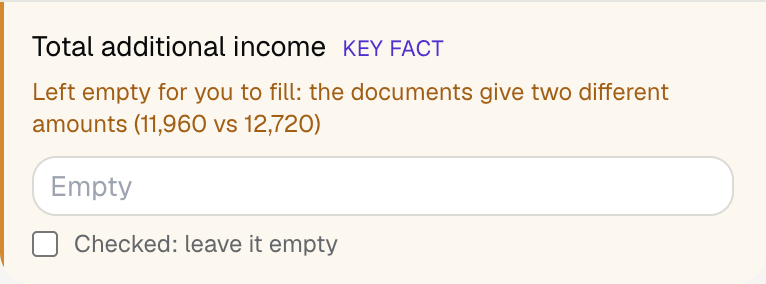
Fyllyo can fill all 68 fields on Schedule 1 (Form 1040) from the client’s documents. Lines the documents don’t support stay blank and are listed for you to check.
You confirm on every form
Fyllyo reads the documents you already have. These can be PDFs, scans, photos, Word files or typed notes, and you can add several at once. Fyllyo works out which document answers which line.
Client documents and the filled form never leave your computer. Fyllyo uploads nothing. Once it is set up, filling works offline.
Fyllyo doesn’t decide what to file, give legal or tax advice, or submit Schedule 1 (Form 1040) for you. Use the IRS’s official page for Schedule 1 (Form 1040) and your professional judgement. Fyllyo does the reading and the typing.
The built-in Schedule 1 (Form 1040) is the 2024 version. For a different edition, add that fillable PDF as your own form. You set it up once, then fill it like this one. Set up that fillable PDF as your own form →
Fyllyo reads scans and photos as well as PDFs, Word files and typed notes. Clear, readable copies give the best results, and every answer on Schedule 1 (Form 1040) still shows the line it came from.
Try form filling free for 5 days. Then buy Fyllyo Paid once for $99. It is a lifetime licence with free updates and no subscription. Filling forms on your Mac uses no AI credits. Pricing and licence details.