Skip to content

TAX FORMS · IRS · BUILT IN

Fill Form 1099-OID with AIOriginal Issue Discount

Add the preparation request, the broker’s annual OID statement, the tax lot worksheet and any related summaries. Fyllyo fills Form 1099-OID on your Mac and shows the lines behind each answer for you to check.

Official form , instructions and page from the IRS.

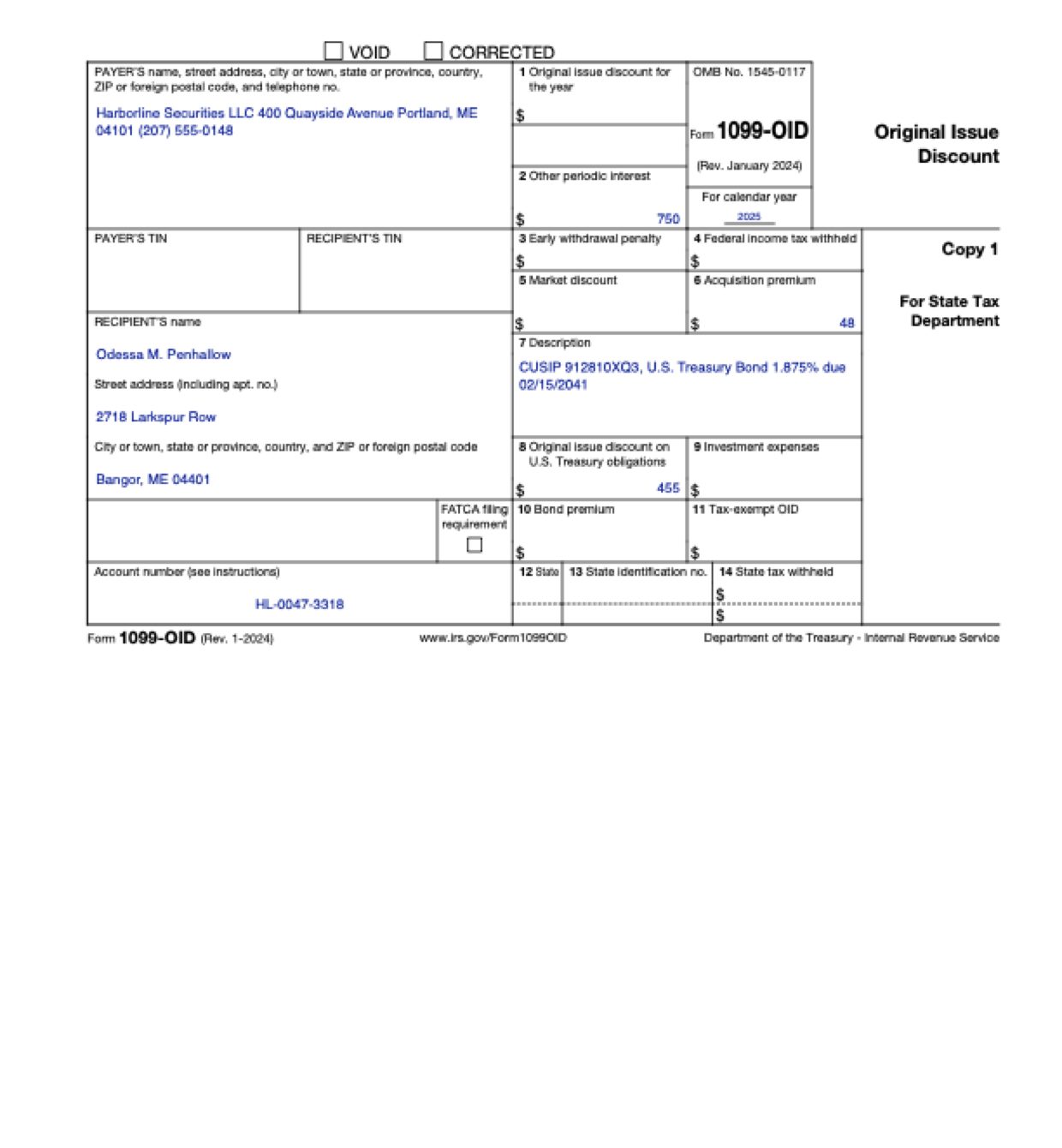
Page 3 of Form 1099-OID as Fyllyo filled it for a test client in a recorded run.
Page 3 of Form 1099-OID, as Fyllyo filled it for a test client

Where AI form filling goes wrong on Form 1099-OID

A broker’s OID statement packs several kinds of discount, interest and premium onto one page, next to figures for the whole life of the bond, last year’s numbers and other securities in the same account. Each belongs in its own box, or on no box at all. These are the common places AI tools and autofill get it wrong. What the form requires is for the IRS to say. Follow its instructions. IRS instructions for Form 1099-OID.

Treasury OID in the general OID box

The form has one box for OID in general and another for OID on U.S. Treasury obligations, and statements often call both “original issue discount”. Software can put Treasury OID in box 1, or the same amount in both.

The year’s OID, not the bond’s whole discount

An OID statement also prints the discount over the bond’s whole life, what’s left to accrue, and last year’s figure for comparison. Software can copy any of them as this year’s OID.

Acquisition premium netted against OID

When a bond was bought above its adjusted issue price, records show the year’s OID, the premium amortized and often a net figure. Software can subtract one from the other, or copy the net figure into the OID box.

Interest that belongs elsewhere

Box 2 is for the bond’s periodic interest. The same file shows interest paid to the seller at purchase and the discount on a Treasury bill in the same account. Software can add them in.

Another security in the same account

A brokerage account holds more than one security, and a Treasury bill’s discount is reported on a different form. Software that reads the whole account can add the bill’s discount to the bond’s OID.

The clearing firm or the Treasury in the payer box

Statements are often printed and mailed by a clearing firm, and the bond names the U.S. Treasury as issuer. Software can take the mailing firm’s P.O. box or the issuer as the payer.

CUSIP and account number swapped

Statements show an account number, a CUSIP and other security numbers close together. Software can put the CUSIP in the account number box, or the account number in the description.

How Fyllyo takes care of them

With a test client and five documents (a preparation request, the annual OID statement, a Form 1099-INT summary for a Treasury bill, a tax lot worksheet and the clearing firm’s cover letter), Fyllyo filled 30 fields across the form’s copies in 12 seconds. Each answer shows the lines it came from.

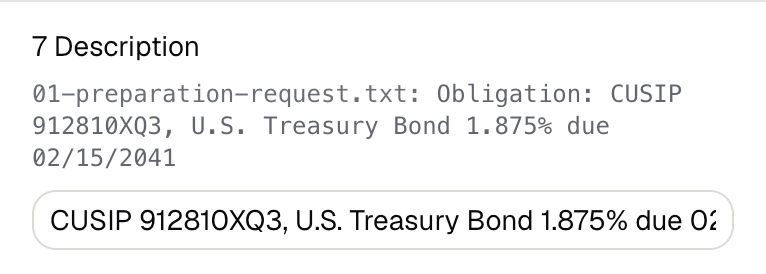
Fyllyo's review of a test Form 1099-OID: box 7, the description, filled with the bond's CUSIP and name, shown with the line from the preparation request it came from.
  • Treasury OID in the general OID box. Sorts each amount by the box the statement assigns it, so Treasury OID goes in box 8 and box 1 stays empty. In the test, box 8 was 455.
  • The year’s OID, not the bond’s whole discount. Reads only the amount reported for the year being filed. In the test, that was 455, not the 10,200 total discount, the 8,584 still to accrue or last year’s 341.
  • Acquisition premium netted against OID. Reports the OID and the acquisition premium each in its own box, as the statement does, and never works out a net amount. In the test, that was 455 and 48, not 407.
  • Interest that belongs elsewhere. Fills box 2 with the interest the statement reports for this bond and this year only. In the test, that was 750, not 803 with the purchase interest or 1,037 with the bill.
  • Another security in the same account. Reads only the obligation the return is for, so the bill’s 287 stayed off this form in the test.
  • The clearing firm or the Treasury in the payer box. Fills the payer box from the payer section of the statement. It uses the broker’s name, street address and phone, not the clearing firm’s or the issuer’s.
  • CUSIP and account number swapped. Fills the account number only next to an account label, and box 7 only with the statement’s description of the obligation.

How much of a Form 1099-OID does Fyllyo fill?

Fyllyo can fill all 82 fields on Form 1099-OID from the client’s documents. Lines the documents don’t support stay blank and are listed for you to check.

You confirm on every form

  • Payer's TIN
  • Recipient's TIN
  • Recipient's name
  • Original issue discount for the year
  • Original issue discount on U.S. Treasury obligations
  • and 1 more

What do you give Fyllyo?

Fyllyo reads the documents you already have. These can be PDFs, scans, photos, Word files or typed notes, and you can add several at once. Fyllyo works out which document answers which line.

Client data stays on your Mac

Client documents and the filled form never leave your computer. Fyllyo uploads nothing. Once it is set up, filling works offline.

What Fyllyo doesn’t do

Fyllyo doesn’t decide what to file, give legal or tax advice, or submit Form 1099-OID for you. Use the IRS’s instructions for Form 1099-OID and your professional judgement. Fyllyo does the reading and the typing.

What if a document is a scan or a photo?

Fyllyo reads scans and photos as well as PDFs, Word files and typed notes. Clear, readable copies give the best results, and every answer on Form 1099-OID still shows the line it came from.

Fill your next Form 1099-OID on your Mac

Try form filling free for 5 days. Then buy Fyllyo Paid once for $99. It is a lifetime licence with free updates and no subscription. Filling forms on your Mac uses no AI credits. Pricing and licence details.