Skip to content

TAX FORMS · IRS · BUILT IN

Fill Form 1099-PATR with AITaxable Distributions from Cooperatives

Add the cooperative’s annual patronage statement, its notices, the payment and redemption advices, grain settlements and the member record. Fyllyo fills Form 1099-PATR on your Mac and shows the lines behind each answer for you to check.

Official form , instructions and page from the IRS.

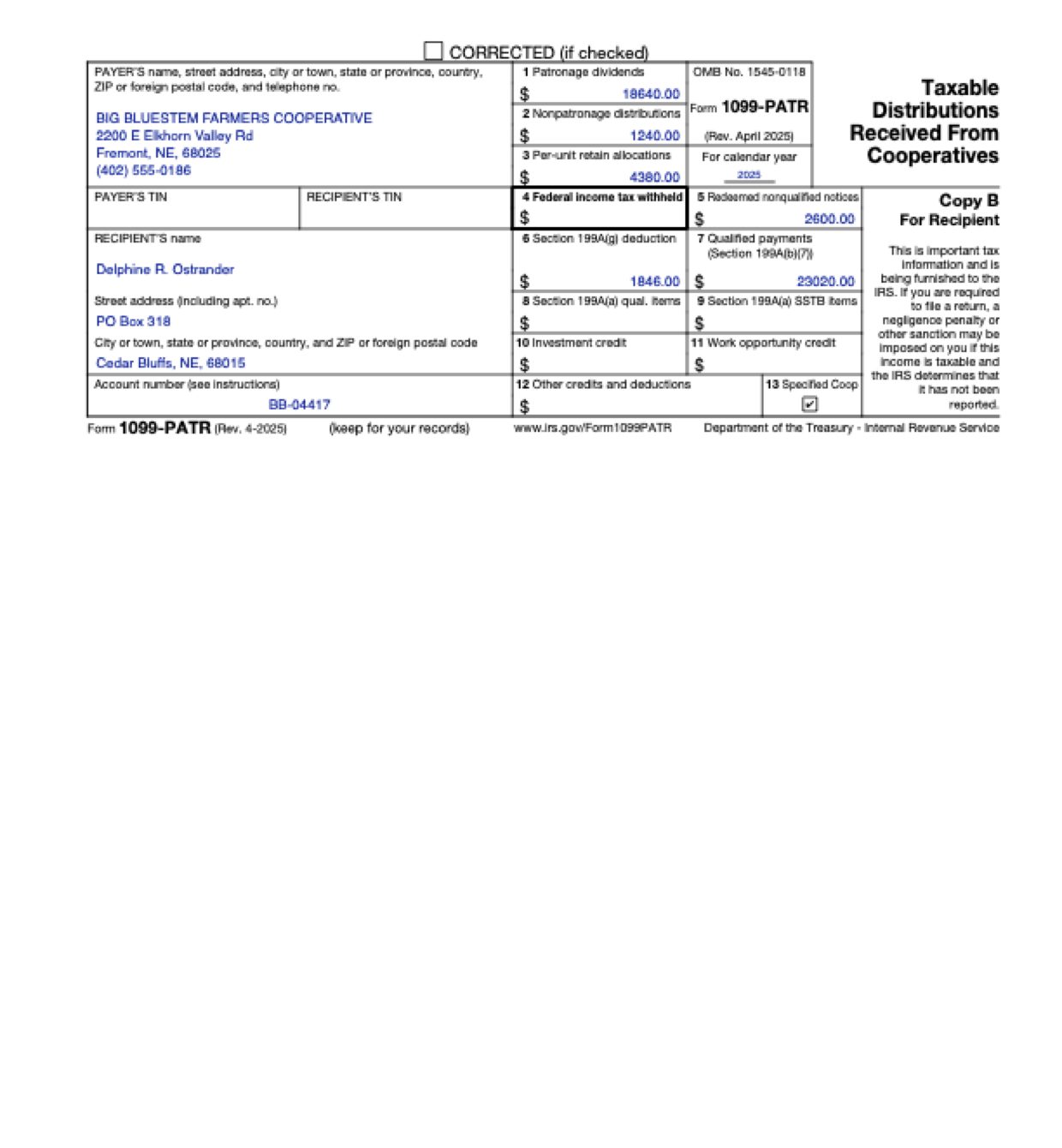
Page 3 of Form 1099-PATR as Fyllyo filled it for a test client in a recorded run.
Page 3 of Form 1099-PATR, as Fyllyo filled it for a test client

Where AI form filling goes wrong on Form 1099-PATR

A cooperative’s year for one member is spread across refund checks, written notices, redemption checks, grain settlements and tax notices, each with its own dollar figures, and Form 1099-PATR sorts them into separate boxes. These are the common places AI tools and autofill get it wrong. What the form requires is for the IRS to say. Follow its instructions. IRS instructions for Form 1099-PATR.

The refund check isn’t the whole patronage dividend

A patronage refund is often paid partly by check and partly as a written notice of allocation. Software can copy the check amount or the retained part, when box 1 covers more than the cash, as the form says.

Nonpatronage distributions kept apart

Nonpatronage distributions have their own box, but statements list them next to patronage dividends. Software can add them into box 1 or drop them.

The per-unit retain amount, not the rate or the bushels

Grain settlements show bushels, a per-bushel retain rate, gross proceeds and net pay on every line. Software can copy the rate, a single settlement or the gross into box 3.

Only nonqualified redemptions in box 5

An equity redemption check can pay off nonqualified notices and qualified equity at once. Box 5 is for redeemed nonqualified notices, as the form says, and software can copy the whole check.

The mailing address, not the farm

A farm member’s papers carry the farm or delivery location, a former address and the mailing address. Software can fill the farm address because it appears on the most documents.

The member, not the farm’s business name

Settlement sheets and checks are often made out to the farm’s operating name. Software can copy that name as the recipient.

How Fyllyo takes care of them

With a test client and seven documents (a reporting request, the annual patronage statement, a Section 199A(g) notice, a patronage refund advice, an equity redemption advice, a grain settlement summary and the membership record), Fyllyo filled 13 fields in 43 seconds. Each answer shows the lines it came from.

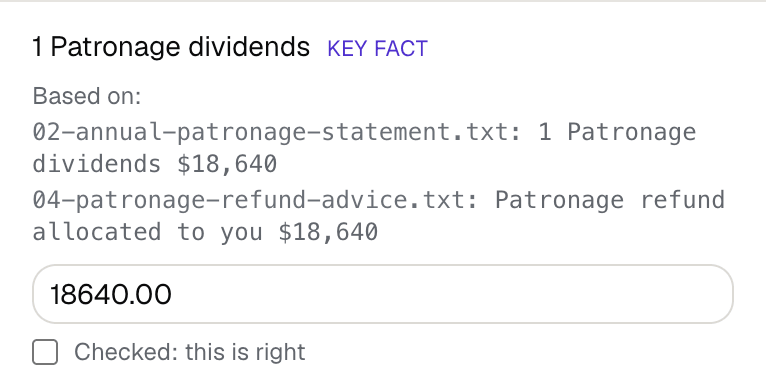
Fyllyo's review of a test Form 1099-PATR: box 1 patronage dividends filled as 18640.00, shown with the lines from the annual patronage statement and the refund advice it came from.
  • The refund check isn’t the whole patronage dividend. Reads box 1 from the cooperative’s yearly patronage dividend total, never a single check or one part of the allocation. In the test, that was 18,640.
  • Nonpatronage distributions kept apart. Keeps each category in its own box. Patronage dividends go in box 1 and nonpatronage distributions in box 2.
  • The per-unit retain amount, not the rate or the bushels. Fills box 3 with the year’s per-unit retain allocation the cooperative reports, never a rate, a bushel count or sale proceeds.
  • Only nonqualified redemptions in box 5. Fills box 5 only from amounts the cooperative labels as redeemed nonqualified notices. In the test, that was 2,600, not the 5,750 check.
  • The mailing address, not the farm. Fills the recipient’s current mailing address from the cooperative’s records, never the farm location or a replaced address.
  • The member, not the farm’s business name. Fills the recipient’s own name as the cooperative records it, not a trade or farm name.

How much of a Form 1099-PATR does Fyllyo fill?

Fyllyo can fill all 22 fields on Form 1099-PATR from the client’s documents. Lines the documents don’t support stay blank and are listed for you to check.

You confirm on every form

  • Recipient's TIN
  • Recipient's name
  • Patronage dividends
  • Nonpatronage distributions
  • Federal income tax withheld

What do you give Fyllyo?

Fyllyo reads the documents you already have. These can be PDFs, scans, photos, Word files or typed notes, and you can add several at once. Fyllyo works out which document answers which line.

Client data stays on your Mac

Client documents and the filled form never leave your computer. Fyllyo uploads nothing. Once it is set up, filling works offline.

What Fyllyo doesn’t do

Fyllyo doesn’t decide what to file, give legal or tax advice, or submit Form 1099-PATR for you. Use the IRS’s instructions for Form 1099-PATR and your professional judgement. Fyllyo does the reading and the typing.

What if a document is a scan or a photo?

Fyllyo reads scans and photos as well as PDFs, Word files and typed notes. Clear, readable copies give the best results, and every answer on Form 1099-PATR still shows the line it came from.

Fill your next Form 1099-PATR on your Mac

Try form filling free for 5 days. Then buy Fyllyo Paid once for $99. It is a lifetime licence with free updates and no subscription. Filling forms on your Mac uses no AI credits. Pricing and licence details.