Skip to content

TAX FORMS · IRS · BUILT IN

Fill Form 2553 with AIElection by a Small Business Corporation

Add the corporation’s formation records, board minutes, stock ledger and signed shareholder consents. Fyllyo fills Form 2553 on your Mac. Anything the documents can’t settle is left for you, with the reason.

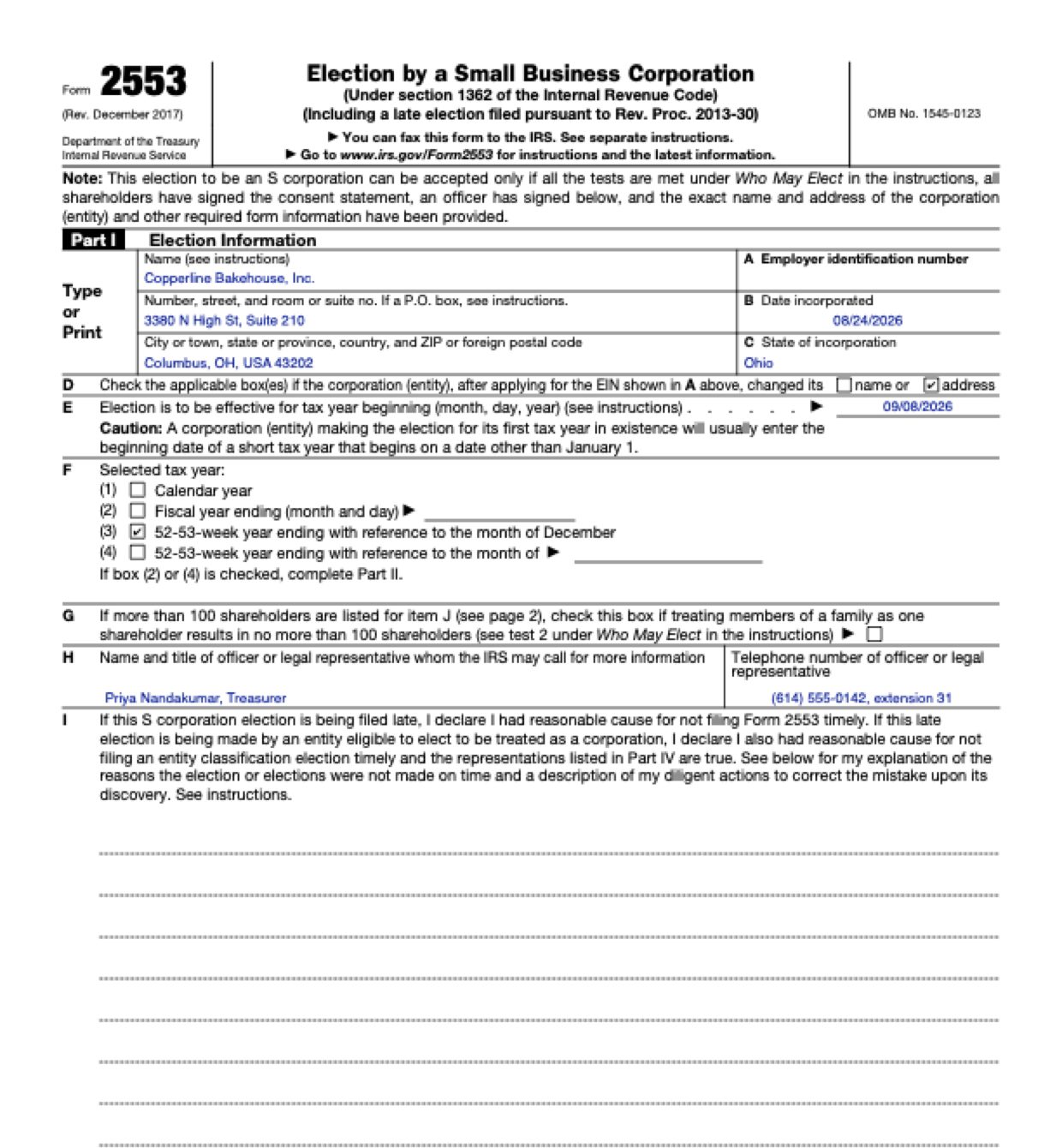
Official form and page from the IRS.

Page 2 of Form 2553 as Fyllyo filled it for a test client in a recorded run.
Page 2 of Form 2553, as Fyllyo filled it for a test client

Where AI form filling goes wrong on Form 2553

Form 2553 is short, but its answers are spread across a new corporation’s formation papers, board minutes, stock ledger and consent pages, and each holds dates, names and phone numbers that belong somewhere else, or nowhere, on the form. These are the common places AI tools and autofill get it wrong. What the form requires is for the IRS to say. Follow its instructions. IRS official page for Form 2553.

The date the election takes effect

A new corporation’s papers carry several dates: incorporation, the EIN letter, the first share issue, the consent signatures and the planned filing date. Software can copy the incorporation date or a signing date as the date the election takes effect.

Two boxes for a 52–53-week year

Item F has one box for a 52–53-week year ending with reference to December, and one with a blank for any other month, as the form shows. Software can mark the wrong one, or write “December” in the blank.

Late-election wording on a timely election

Files often hold reasonable-cause wording drafted in case an election ends up late. Software can copy it into item I even when the election is on time.

Shareholders who have already sold

The instructions can require consents from everyone who owned shares during the period, including people who have since sold. A stock ledger’s current owners leave them out.

Consent signatures nobody has given yet

Column K is where each shareholder signs and dates their consent. Software can type a shareholder’s printed name there, or use the date the packet was put together, even for a consent that hasn’t come back.

The IRS contact isn’t the signer or the accountant

The officer who signs, the person the IRS may call and the outside accountant are often three different people. Software can put whoever appears first in item H.

How Fyllyo takes care of them

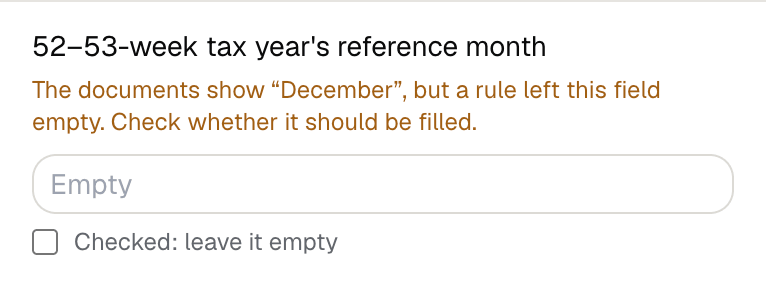
With a test client and six documents (articles and EIN records, board minutes, the stock ledger, signed consents, the accountant’s memo and the filing instructions), Fyllyo filled 28 fields in 23 seconds. It kept a month off the form and showed the preparer what it found.

Fyllyo's review of a test Form 2553: the 52-53-week tax year's reference month left empty, with the note that the documents show December but a rule left the field empty.
  • The date the election takes effect. Reads item E only from the approved election instructions, and keeps the incorporation date for item B. In the test, item E was September 8, 2026 and item B was August 24, 2026.
  • Two boxes for a 52–53-week year. Ticks the December box, leaves the month blank empty and shows you the month it kept off.
  • Late-election wording on a timely election. Fills the explanation only when the approved instructions say the election is late.
  • Shareholders who have already sold. Lists everyone the ownership records name for the period, including a shareholder whose shares were redeemed, with that person’s own consent.
  • Consent signatures nobody has given yet. Copies a signature only from a consent the shareholder already signed, with its own date. A consent not yet returned is left empty for you.
  • The IRS contact isn’t the signer or the accountant. Fills item H with the person the instructions name for IRS questions, and reads the signing officer’s title on its own.

How much of a Form 2553 does Fyllyo fill?

Fyllyo fills 93 of the 100 fields on Form 2553 from the client’s documents. Lines the documents don’t support stay blank and are listed for you to check.

You do

  • Consent signature for each shareholder
  • and 6 more fields that need your judgement

You confirm on every form

  • Corporation's name
  • Corporation's EIN
  • Corporation's employer identification number
  • Income beneficiary's name and address
  • Income beneficiary's social security number

What do you give Fyllyo?

Fyllyo reads the documents you already have. These can be PDFs, scans, photos, Word files or typed notes, and you can add several at once. Fyllyo works out which document answers which line.

Client data stays on your Mac

Client documents and the filled form never leave your computer. Fyllyo uploads nothing. Once it is set up, filling works offline.

What Fyllyo doesn’t do

Fyllyo doesn’t decide what to file, give legal or tax advice, or submit Form 2553 for you. Use the IRS’s official page for Form 2553 and your professional judgement. Fyllyo does the reading and the typing.

What if a document is a scan or a photo?

Fyllyo reads scans and photos as well as PDFs, Word files and typed notes. Clear, readable copies give the best results, and every answer on Form 2553 still shows the line it came from.

Fill your next Form 2553 on your Mac

Try form filling free for 5 days. Then buy Fyllyo Paid once for $99. It is a lifetime licence with free updates and no subscription. Filling forms on your Mac uses no AI credits. Pricing and licence details.