Skip to content

TAX FORMS · IRS · BUILT IN

Fill Form 4868 with AIApplication for Automatic Extension of Time To File U.S. Individual Income Tax Return

Add the extension intake, the tax projection and the payment confirmations. Fyllyo fills Form 4868 on your Mac. Anything the documents disagree on is left for you, with the reason.

Official form and page from the IRS.

Where AI form filling goes wrong on Form 4868

Form 4868 is short, but the numbers on it come from papers full of look-alikes: last year’s tax beside this year’s, state payments beside federal ones, a balance printed before the estimate changed, and payment receipts for more than one tax year. These are the common places AI tools and autofill get it wrong. What the form requires is for the IRS to say. Follow its instructions. IRS official page for Form 4868.

Last year’s tax, or an estimate that has since changed

Tax projections often put last year’s total tax beside this year’s, and a first estimate beside a revised one, with the state tax underneath. Software can copy the wrong column or the older figure.

Payments that don’t belong to this return

Payment records mix federal and state estimates, next year’s first installment and the extension payment itself. Software that adds every payment it finds, or goes by the date paid, gets the total wrong.

A balance due that nobody updated

A worksheet’s summary page can be printed before the estimate changes, so the balance it shows no longer matches the lines above it. Software that copies the printed balance fills a number that doesn’t add up.

Two names on a joint return

A joint extension names both spouses. Payment receipts and bank records often show only one of them, and software can fill that one name.

A trip abroad, and a foreign address in the file

The “out of the country” box has a meaning of its own, as the form explains. Software can tick it because someone is abroad on the due date, or take a temporary foreign address for the mailing address.

The wrong payment and the wrong confirmation number

A payment printout often holds more than one confirmation, for example the extension payment and next year’s first estimate. Software can take the first number, the other payment’s amount, or the bank account digits.

How Fyllyo takes care of them

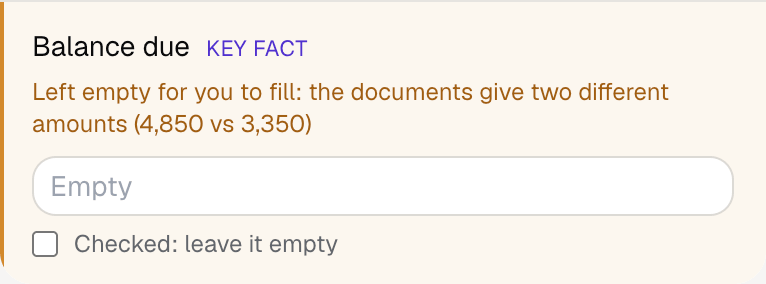
With a test client and four documents (an extension intake, the preparer’s worksheet, a K-1 cover letter and the payment confirmations), Fyllyo filled 9 fields in 14 seconds. It left the balance due for the preparer, with both amounts.

Fyllyo's review of a test Form 4868: the balance due left empty with the note that the documents give two different amounts, 4,850 and 3,350.
  • Last year’s tax, or an estimate that has since changed. Reads the current estimate of this year’s total federal tax. In the test, that was 31,400, not last year’s 27,960, the first estimate of 29,900 or the state tax.
  • Payments that don’t belong to this return. Totals only the federal payments credited to the year being extended, including a January estimate for that year, and leaves out state payments, next year’s estimates and the extension payment.
  • A balance due that nobody updated. Works out the balance from the estimated tax and the payments and compares it with any balance the documents state. When they differ, it leaves the balance empty and shows both amounts.
  • Two names on a joint return. For a joint return it fills both names in the order the intake gives.
  • A trip abroad, and a foreign address in the file. Ticks the box only when the documents say so in as many words, and uses the mailing address the intake names, not the temporary one abroad.
  • The wrong payment and the wrong confirmation number. Fills the amount paid with the extension and that payment’s own confirmation number, as written.

How much of a Form 4868 does Fyllyo fill?

Fyllyo can fill all 17 fields on Form 4868 from the client’s documents. Lines the documents don’t support stay blank and are listed for you to check.

You confirm on every form

  • Taxpayer name
  • Taxpayer Social Security number
  • Estimated total tax liability for 2024
  • Balance due

What do you give Fyllyo?

Fyllyo reads the documents you already have. These can be PDFs, scans, photos, Word files or typed notes, and you can add several at once. Fyllyo works out which document answers which line.

Client data stays on your Mac

Client documents and the filled form never leave your computer. Fyllyo uploads nothing. Once it is set up, filling works offline.

What Fyllyo doesn’t do

Fyllyo doesn’t decide what to file, give legal or tax advice, or submit Form 4868 for you. Use the IRS’s official page for Form 4868 and your professional judgement. Fyllyo does the reading and the typing.

What if a document is a scan or a photo?

Fyllyo reads scans and photos as well as PDFs, Word files and typed notes. Clear, readable copies give the best results, and every answer on Form 4868 still shows the line it came from.

Fill your next Form 4868 on your Mac

Try form filling free for 5 days. Then buy Fyllyo Paid once for $99. It is a lifetime licence with free updates and no subscription. Filling forms on your Mac uses no AI credits. Pricing and licence details.