Skip to content

GOVERNMENT FORMS · State Department · BUILT IN

Fill Form DS-11 with AIApplication for a U.S. Passport

Add the applicant’s intake notes, birth and marriage certificates, itinerary and passport history. Fyllyo fills Form DS-11 on your Mac. Anything it can’t settle from the documents is left for you, with the reason.

Official form and instructions from the State Department.

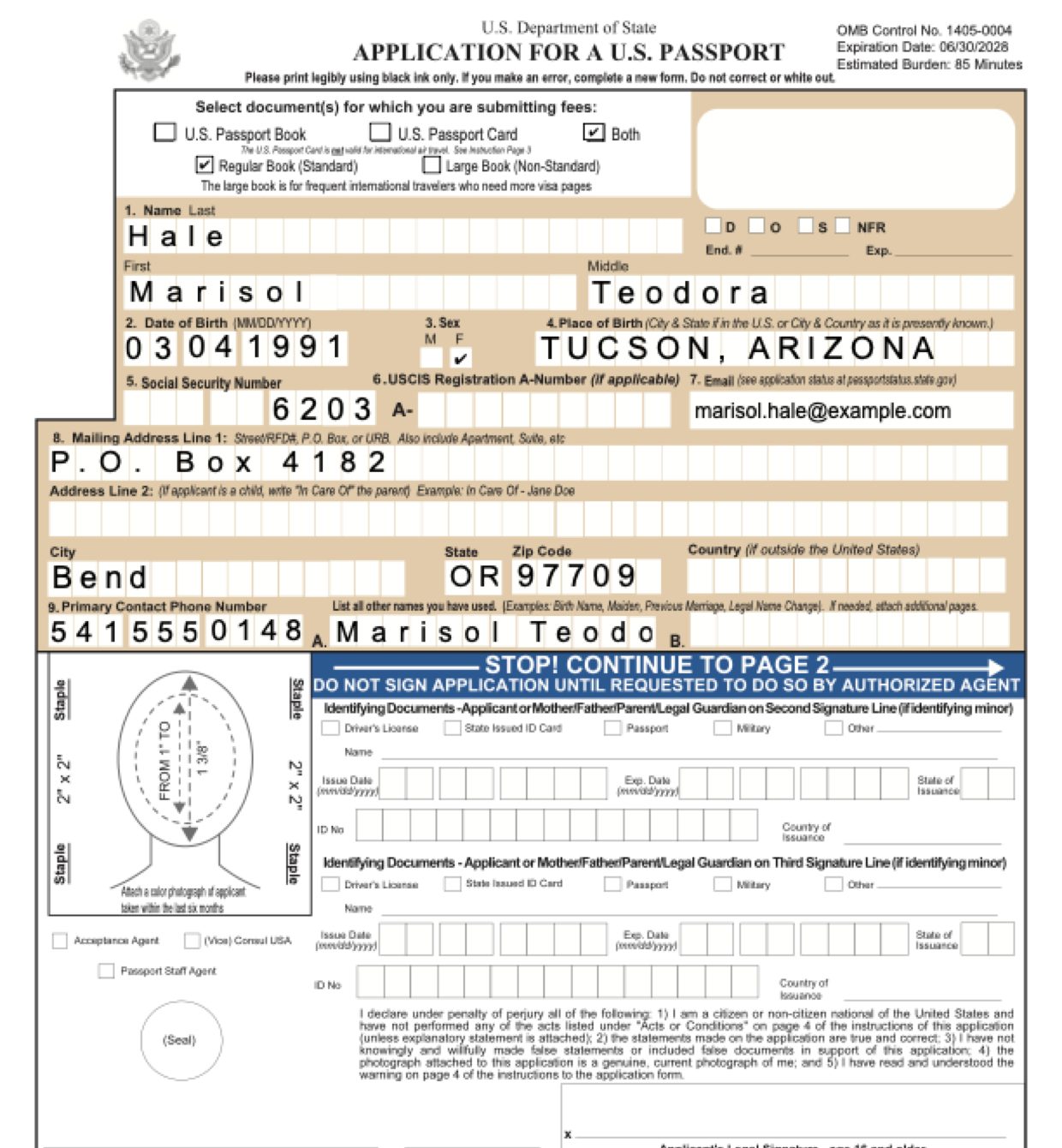
Page 5 of Form DS-11 as Fyllyo filled it for a test client in a recorded run.
Page 5 of Form DS-11, as Fyllyo filled it for a test client

Where AI form filling goes wrong on Form DS-11

Most of Form DS-11 is copying names, dates and addresses. The trouble starts where the documents hold more than one version of the answer: an old name, a former address, a person who appears in several roles. These are the common places AI tools and autofill get it wrong. What the form requires is for the U.S. Department of State to say. Follow its instructions. State Department instructions for Form DS-11.

The name on the old passport isn’t today’s name

After a marriage or name change, the old passport, the birth certificate and the intake each show a different name. Software can fill the current name where the form asks for the name printed on the old passport, or drop the old name altogether.

A parent’s name today, not at birth

Intake notes usually give a parent’s current name, often a married name. Section 10 asks for names at the parent’s birth, as the form says. Software can copy the name it sees first.

A P.O. box, a home address and an old address on the license

The mailing address is a P.O. box, the person lives somewhere else, and the driver license still shows a former address. Software can put the license address on the form, or leave out the permanent address the form asks for when mail goes to a P.O. box.

An emergency contact who is on the trip

Section 20 asks for a person not traveling with the applicant, as the form says. People often name their spouse, who is on the same booking. Software copies the name it’s given, or picks another relative from the notes.

A theft and a loss are two different answers

The book was stolen and the card was lost, a year apart. Software can mark the same box for both, or rewrite the person’s statement into a summary that drops the numbers, dates and police report.

Dates written out, boxes that want MM/DD/YYYY

Birth certificates, itineraries and marriage records write dates as “March 4, 1991” or “Feb 14, 2027”. The form wants MM/DD/YYYY and splits the birth date into three boxes. Software can copy the date as written, or swap month and day.

How Fyllyo takes care of them

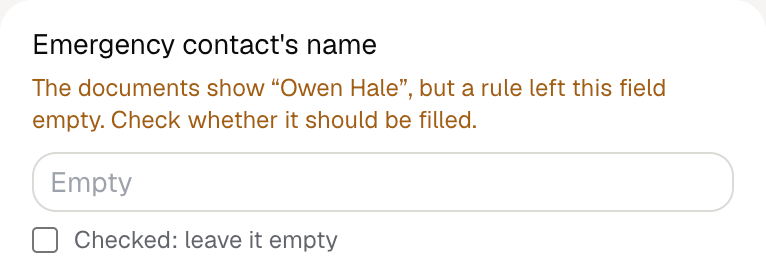
With a test client and seven documents (intake notes, a birth certificate, a marriage certificate, a driver license, a Social Security letter, a travel itinerary and a lost-and-stolen statement), Fyllyo filled 61 fields in 19 seconds. It kept the emergency contact off the form and showed the preparer the name it found.

Fyllyo's review of a test Form DS-11: the emergency contact's name left empty, with the note that the documents show Owen Hale but a rule left the field empty.
  • The name on the old passport isn’t today’s name. Reads the name exactly as printed on the most recent book and card, kept apart from the current legal name, and lists the earlier name under other names used.
  • A parent’s name today, not at birth. Reads each parent’s name at birth from the birth record and keeps each parent’s details together.
  • A P.O. box, a home address and an old address on the license. Reads the current mailing and home addresses from the intake, not from an older ID, and fills the permanent address only when the mailing address is a P.O. box or a different place.
  • An emergency contact who is on the trip. Fills the emergency contact only when the documents show that person isn’t traveling. Otherwise it leaves Section 20 for you, tells you who it kept off, and never picks a relative on its own.
  • A theft and a loss are two different answers. Keeps the book and the card apart, ticks each one’s own status, and copies the person’s statement as written.
  • Dates written out, boxes that want MM/DD/YYYY. Reads the date as written and turns it into the form’s format itself.

How much of a Form DS-11 does Fyllyo fill?

Fyllyo can fill all 83 fields on Form DS-11 from the client’s documents. Lines the documents don’t support stay blank and are listed for you to check.

You confirm on every form

  • Applicant's last name
  • Applicant's first name
  • Applicant's birth year
  • Applicant's Social Security number
  • Applicant's USCIS registration A-Number
  • and 4 more

What do you give Fyllyo?

Fyllyo reads the documents you already have. These can be PDFs, scans, photos, Word files or typed notes, and you can add several at once. Fyllyo works out which document answers which line.

Client data stays on your Mac

Client documents and the filled form never leave your computer. Fyllyo uploads nothing. Once it is set up, filling works offline.

What Fyllyo doesn’t do

Fyllyo doesn’t decide what to file, give legal or tax advice, or submit Form DS-11 for you. Use the State Department’s instructions for Form DS-11 and your professional judgement. Fyllyo does the reading and the typing.

What if a document is a scan or a photo?

Fyllyo reads scans and photos as well as PDFs, Word files and typed notes. Clear, readable copies give the best results, and every answer on Form DS-11 still shows the line it came from.

Fill your next Form DS-11 on your Mac

Try form filling free for 5 days. Then buy Fyllyo Paid once for $99. It is a lifetime licence with free updates and no subscription. Filling forms on your Mac uses no AI credits. Pricing and licence details.