Skip to content

GOVERNMENT FORMS · State Department · BUILT IN

Fill Form DS-5507 with AIAffidavit of Physical Presence

Add the parent’s intake notes, presence and residence schedule, and civil records. Fyllyo fills Form DS-5507 on your Mac. Anything a rule keeps off the form is shown to you, with what the documents said.

Official form and instructions from the State Department.

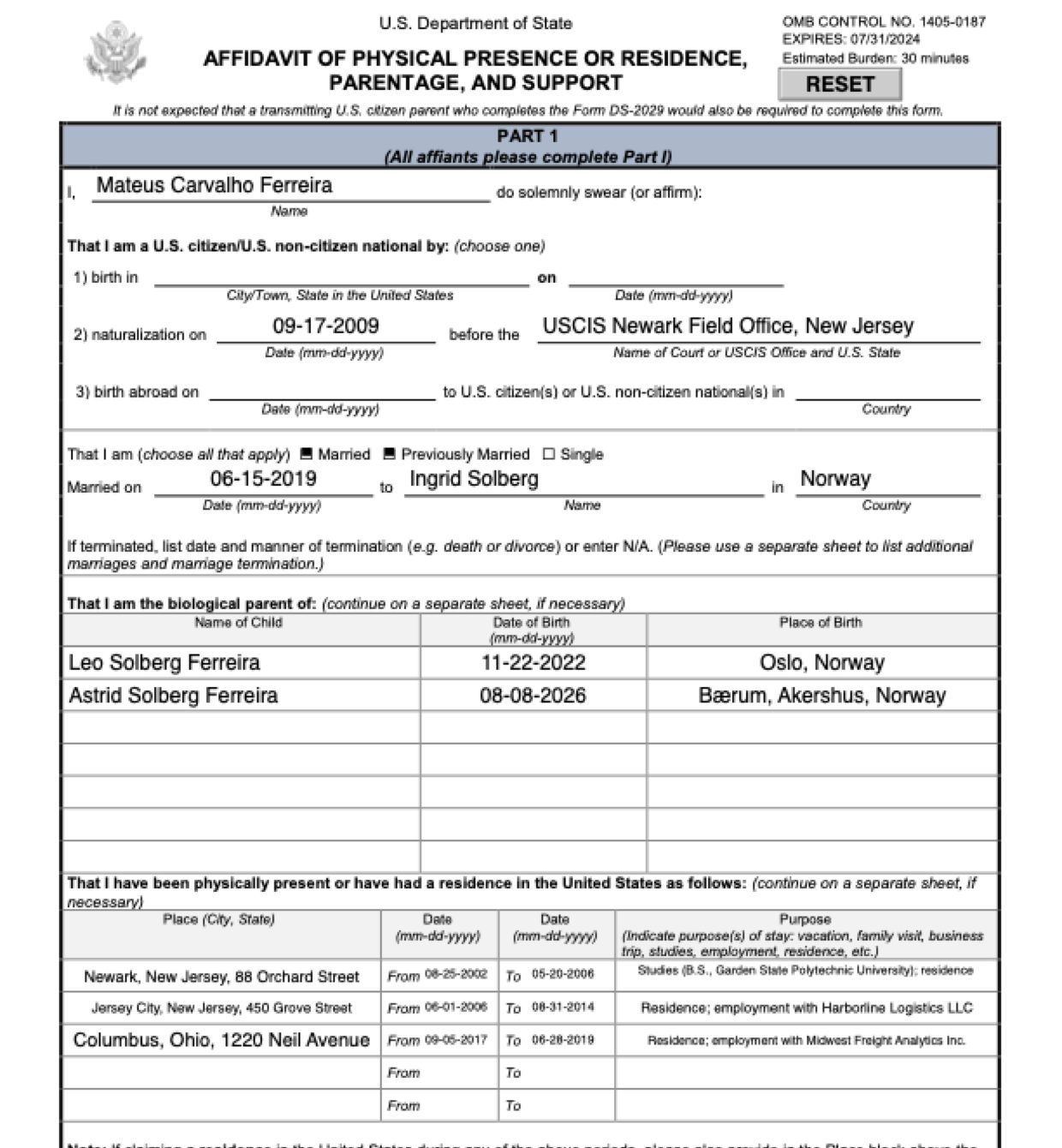
Page 2 of Form DS-5507 as Fyllyo filled it for a test client in a recorded run.
Page 2 of Form DS-5507, as Fyllyo filled it for a test client

Where AI form filling goes wrong on Form DS-5507

Form DS-5507 asks one parent to account for years of their life: periods in the United States with dates, purposes and the home they lived in, next to marriages, children and the other parent’s status. The documents mix two people’s histories and the addresses of schools and employers. These are the common places AI tools and autofill get it wrong. What the form requires is for the U.S. Department of State to say. Follow its instructions. State Department instructions for Form DS-5507.

Three ways to be a citizen, one line each

Form DS-5507 gives birth in the United States, naturalization and birth abroad to U.S. citizen parents a line each. A parent born abroad and naturalized later has a foreign birthplace and birth date in every record, and software can fill them on the birth-abroad line too.

The other parent’s years in the U.S.

The other parent’s presence table is for a parent who is a U.S. citizen or national, as the form says. Notes often include that parent’s student years in the U.S. anyway, and software copies them into that table, or into the affiant’s own.

A school’s or employer’s address for the home

University letters and employment letters carry the campus and office addresses, and their start and end dates differ from move-in and move-out dates. Software can take those for where the parent lived, and when.

Two marriages, one row

The form has one row for a marriage, and a parent who divorced and remarried has two sets of dates, spouses and countries. Software can pair the spouse from one marriage with the date or country of the other.

A stepchild, and the parent as “child”

The children’s table lists the affiant’s own children. A stepchild in the household notes, or the parent’s own birth certificate with “Child” printed above their name, can end up as a row.

How Fyllyo takes care of them

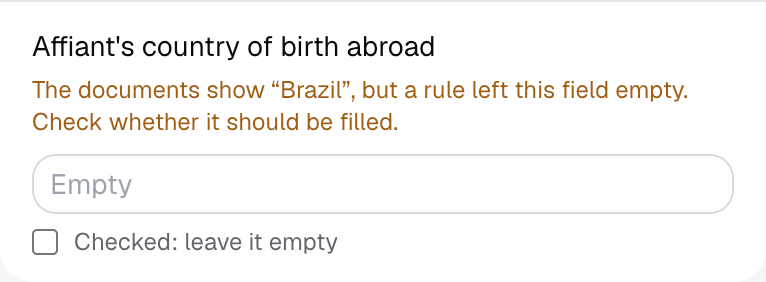
With a test client and ten documents (intake notes, a presence and residence schedule, a naturalization certificate, a birth certificate translation, a marriage certificate, a divorce judgment, the children’s birth records, an employment letter, a university letter and notes on the other parent’s U.S. time), Fyllyo filled 28 fields in 18 seconds. It kept a birth date and country off the citizenship lines and showed the preparer what it found.

Fyllyo's review of a test Form DS-5507: the affiant's country of birth abroad left empty, with the note that the documents show Brazil but a rule left the field empty.
  • Three ways to be a citizen, one line each. Fills only the line for the basis the documents state, here naturalization with its date and office, and shows you the birth date and country it kept off.
  • The other parent’s years in the U.S.. Reads each parent’s periods separately, and fills the other parent’s table only when the documents show that parent is a U.S. citizen or national.
  • A school’s or employer’s address for the home. Fills each U.S. place with the home address from the schedule, never a school’s, employer’s or mailing address, with the schedule’s dates.
  • Two marriages, one row. Fills the row from the current marriage alone, and ticks Previously Married when the documents show an earlier one.
  • A stepchild, and the parent as “child”. Lists only the children the documents show as the affiant’s own, in the order given, with each one’s place of birth from the record.

How much of a Form DS-5507 does Fyllyo fill?

Fyllyo can fill all 103 fields on Form DS-5507 from the client’s documents. Lines the documents don’t support stay blank and are listed for you to check.

You confirm on every form

  • Affiant's name
  • Affiant's U.S. birth date
  • Affiant's birth date abroad

What do you give Fyllyo?

Fyllyo reads the documents you already have. These can be PDFs, scans, photos, Word files or typed notes, and you can add several at once. Fyllyo works out which document answers which line.

Client data stays on your Mac

Client documents and the filled form never leave your computer. Fyllyo uploads nothing. Once it is set up, filling works offline.

What Fyllyo doesn’t do

Fyllyo doesn’t decide what to file, give legal or tax advice, or submit Form DS-5507 for you. Use the State Department’s instructions for Form DS-5507 and your professional judgement. Fyllyo does the reading and the typing.

What if a document is a scan or a photo?

Fyllyo reads scans and photos as well as PDFs, Word files and typed notes. Clear, readable copies give the best results, and every answer on Form DS-5507 still shows the line it came from.

Fill your next Form DS-5507 on your Mac

Try form filling free for 5 days. Then buy Fyllyo Paid once for $99. It is a lifetime licence with free updates and no subscription. Filling forms on your Mac uses no AI credits. Pricing and licence details.