Skip to content

TAX FORMS · IRS · BUILT IN

Fill Form W-2 with AIWage and Tax Statement

Add the payroll register, the wage reconciliation, the benefits statement, the state allocation and the employee’s records. Fyllyo fills the W-2’s copies on your Mac and shows the lines behind each answer for you to check.

Official form , instructions and page from the IRS.

Where AI form filling goes wrong on Form W-2

A W-2 is a page of boxes, but the amounts come from a payroll register, a year-end reconciliation and a benefits statement that each show several wage totals, codes and addresses. Software has to put each number in its own box. These are the common places AI tools and autofill get it wrong. What the form requires is for the IRS to say. Follow its instructions. IRS instructions for Form W-2.

Three wage boxes, three different amounts

Boxes 1, 3 and 5 often hold different amounts, because some pre-tax deductions come out of one and not the others. Payroll records also show gross pay. Software can copy gross pay into every wage box, or one total into all three.

The payroll provider in the employer box

Payroll registers are printed on the provider’s letterhead, with the employer named as a client. Software can take the provider’s name and address as the employer’s.

The address before the move

An employee who moved during the year still has the old address on early records, and the payroll provider may not have caught up. Software can copy the first address it sees.

Two states in one year

After a move, wages are split between two states, each with its own employer ID. Software can report all wages to the home state, use last year’s allocation, or mix one state’s ID with the other’s amounts.

A sales job isn’t a statutory employee

Statutory employee is a narrow category the form’s instructions define. Software can mark it because the job title says sales, or mark every box 13 checkbox that has a benefit behind it.

How Fyllyo takes care of them

With a test client and seven documents (the payroll provider’s year-end register, the employee’s personnel record, an address change, the employer’s wage reconciliation, a benefits schedule, a state wage allocation and the preparation notes), Fyllyo filled 115 fields across the form’s copies in 24 seconds. Each answer shows the lines it came from.

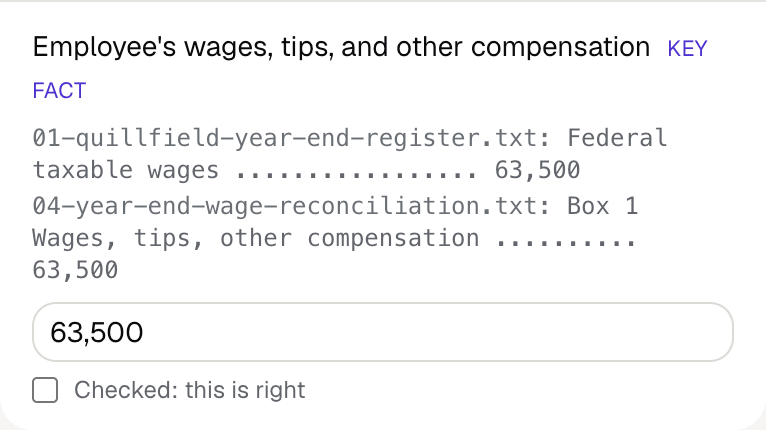
Fyllyo's review of a test Form W-2: box 1 wages filled as 63,500, shown with the lines from the payroll register and the year-end wage reconciliation it came from.
  • Three wage boxes, three different amounts. Reads each wage box from its own labelled total in the year-end records, never gross pay. In the test, that was 63,500 in box 1 and 70,000 in boxes 3 and 5.
  • The payroll provider in the employer box. Fills the employer box from the employer’s own records, never a payroll processor’s name or address.
  • The address before the move. Fills the employee’s address from the latest change of address, never the one it replaced.
  • Two states in one year. Fills the state rows from the final state allocation, keeping each state’s ID, wages and tax together, and skips last year’s rows.
  • A sales job isn’t a statutory employee. Ticks the statutory employee box only when the records say so, and the retirement plan box only when they state plan coverage.

How much of a Form W-2 does Fyllyo fill?

Fyllyo can fill all 221 fields on Form W-2 from the client’s documents. Lines the documents don’t support stay blank and are listed for you to check.

You confirm on every form

  • Employee's social security number
  • Employer identification number
  • Employee's first name and initial
  • Employee's last name
  • Employee's wages, tips, and other compensation
  • and 1 more

What do you give Fyllyo?

Fyllyo reads the documents you already have. These can be PDFs, scans, photos, Word files or typed notes, and you can add several at once. Fyllyo works out which document answers which line.

Client data stays on your Mac

Client documents and the filled form never leave your computer. Fyllyo uploads nothing. Once it is set up, filling works offline.

What Fyllyo doesn’t do

Fyllyo doesn’t decide what to file, give legal or tax advice, or submit Form W-2 for you. Use the IRS’s instructions for Form W-2 and your professional judgement. Fyllyo does the reading and the typing.

What if a document is a scan or a photo?

Fyllyo reads scans and photos as well as PDFs, Word files and typed notes. Clear, readable copies give the best results, and every answer on Form W-2 still shows the line it came from.

Fill your next Form W-2 on your Mac

Try form filling free for 5 days. Then buy Fyllyo Paid once for $99. It is a lifetime licence with free updates and no subscription. Filling forms on your Mac uses no AI credits. Pricing and licence details.