 fyllyo
Acrobat vs Preview on Mac: which do you need for PDF forms?
For reading, signing and simple forms, Preview is enough, and it’s already on your Mac. You need something else when a form works out its own totals, shows “Please wait…”, or holds details you must redact. Free Acrobat Reader handles the first two. Redaction needs Acrobat Pro, at $19.99 a month on an annual plan. Fyllyo is a free Mac app that works out form totals, opens most XFA forms and redacts with a check for leftovers.
Preview or Acrobat: which does what
| Preview | Acrobat Reader | Acrobat Pro | |
|---|---|---|---|
| Price | Built into macOS | Free | $19.99 a month on an annual plan, or $29.99 month to month |
| Fill simple forms | Yes | Yes | Yes |
| Forms that work out their own totals | No. In our test, the total stayed empty and saving deleted all 4 of the form’s scripts. | Yes. IRCC requires it for forms with a Validate button, which runs the form’s own scripts. | Yes |
| “Please wait…” (XFA) forms | No. It shows only the placeholder page. | Yes. IRCC tells applicants to use it. | Yes |
| Redaction | Yes, but in our test the name stayed in a form field, a comment and the file’s info. | No | Yes |
When is Preview enough?
Preview opens and prints PDFs, adds comments and signatures, and fills simple forms. In our test, Preview saved the text, the checkbox, the radio buttons and the dropdown. You don’t need to install anything.
The problems start when a form does more than hold text. Three kinds of PDF need another app.
Does Preview calculate form totals?
No. Many forms work out totals and format dates with their own scripts. Preview doesn’t run them. In our test on macOS 26.2, we filled a work order with 12 hours at $85. The total stayed empty, and when we saved, Preview deleted all 4 of the form’s scripts. After that, the total can’t work in any app, even Acrobat.
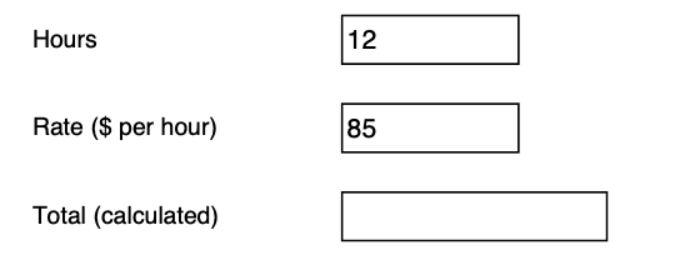
Saved in Preview: the total was never worked out.
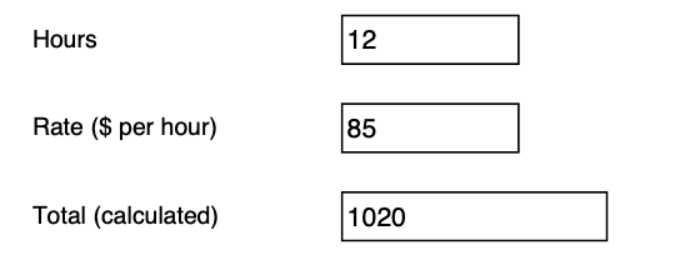
Saved in Fyllyo: the total is 12 × $85 = 1020.
See the full Preview form test, with the files.
What about forms that say “Please wait…”?
Those are dynamic XFA forms. Preview shows only a placeholder page that says “Please wait…”. Acrobat Reader builds the real form, and some agencies, such as Canada’s IRCC, tell applicants to use it. Fyllyo opens and fills most XFA forms for free, but it doesn’t run their buttons, such as Validate, yet. For forms with a Validate button, such as IRCC’s, use Acrobat Reader.
See which government forms are XFA. We checked 32.
Is Preview’s redaction safe?
Only for what’s on the page. In our test, Preview blacked out a name and an SSN on the page. But the name was still in a form field, in a comment and in the file’s title and author, and the SSN was still in the file’s subject. Acrobat Reader can’t redact, and neither can Acrobat Standard at $14.99 a month on an annual plan. Acrobat Pro can, at $19.99 a month on an annual plan.
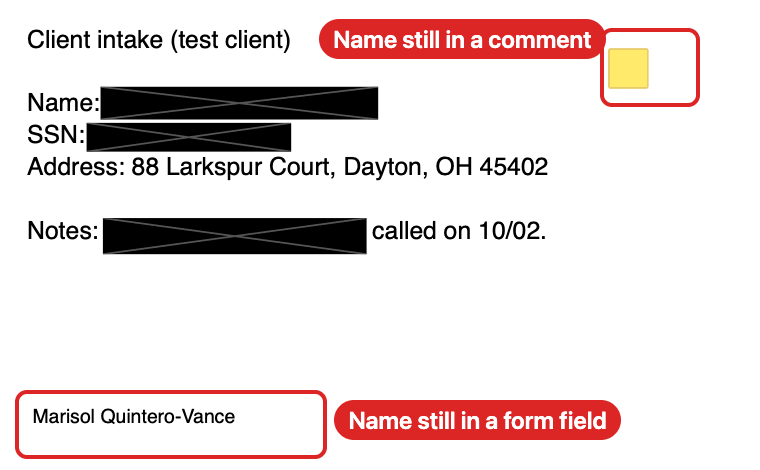
Redacted in Preview: the name is still in a form field and a comment.
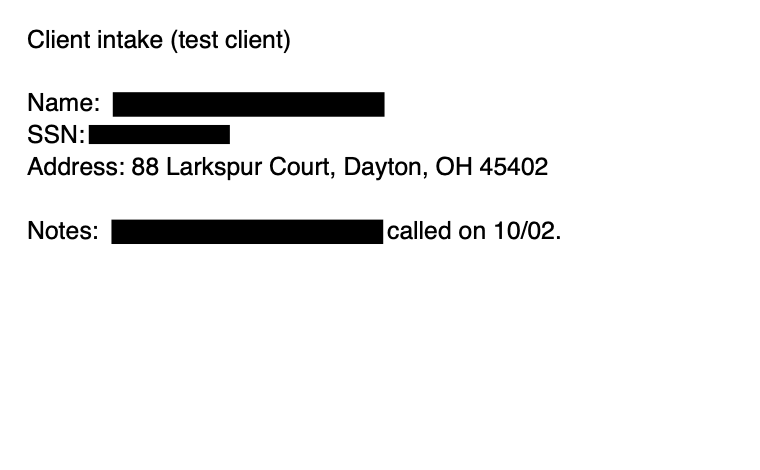
Redacted in Fyllyo: removed from the page, the form field and the comment.
See the full redaction test, with the files.
Where does Fyllyo fit?
Fyllyo is a free PDF app for Macs with Apple silicon. It works out a form’s totals, opens and fills most XFA forms and redacts with a check for leftovers, all without an account. If you fill the same forms for many clients, Fyllyo Paid fills them from your documents for $99 once, on your Mac.
Acrobat still does more. Acrobat Pro edits PDFs deeply, converts them to Office files and works on Windows and phones. If you need those, it’s the better choice. Compare Acrobat alternatives for Mac.
Sources
- Adobe Acrobat pricing, checked October 24, 2026
- IRCC: I can’t open my application form in PDF format, checked October 24, 2026
- Our tests: Preview and PDF forms (October 23, 2026) and Preview’s redaction (October 22, 2026), both on macOS 26.2