 fyllyo
We tested Mac Preview’s redaction. The name was still in the file.
We redacted a test client’s name and SSN in Mac Preview (macOS 26.2) and looked inside the saved PDF. The text under the black boxes was gone, but the name was still in 3 of the 4 places it appeared: a form field, a comment and the document’s details. Fyllyo’s Find and redact removed it from all four.
The result
We redacted a test client’s name and Social Security number in Preview, on macOS 26.2, and saved the PDF. Preview removed them from the page text. The name was still in 3 of the 4 places it appeared in the file, and the SSN was still in the document’s details. In our run, Preview showed no warning about any of it. Preview also kept the name as the form field’s default value, so resetting the form brings it back.
We ran the same file through Fyllyo’s Find and redact. It removed the name and SSN from all four places. In our run, it also flagged the copies it found outside the page before saving.
How we tested
We made a one-page client intake PDF for a test client, Marisol Quintero-Vance, with the made-up SSN 123-45-6789. Her name was in four places, the way it often is in real files:
- the page text;
- a form field, filled in and visible on the page;
- a comment: “Check SSN with Marisol Quintero-Vance before filing”;
- the document’s details: the title, the author, and an SSN in the subject.
On October 22, 2026, in Preview on macOS 26.2, we chose Tools, then Redact, marked the name and the SSN on the page, and saved. We redacted the same file with Fyllyo. Then we looked inside the saved file with qpdf, an open-source PDF inspection tool.
Where the name stayed
| Place in the file | Original | After Preview | After Fyllyo |
|---|---|---|---|
| Page text | Name and SSN | Removed | Removed |
| Form field (visible on the page) | Name | Still there | Removed |
| Comment | Name | Still there | Removed |
| Document details (title, author, subject) | Name and SSN | Still there | Removed |
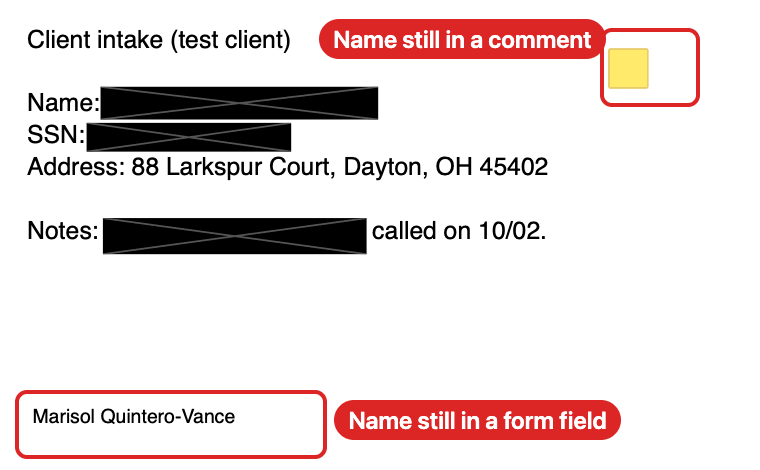
Redacted in Preview: the name is still in a form field and a comment, and in the title and author; the SSN is still in the subject.
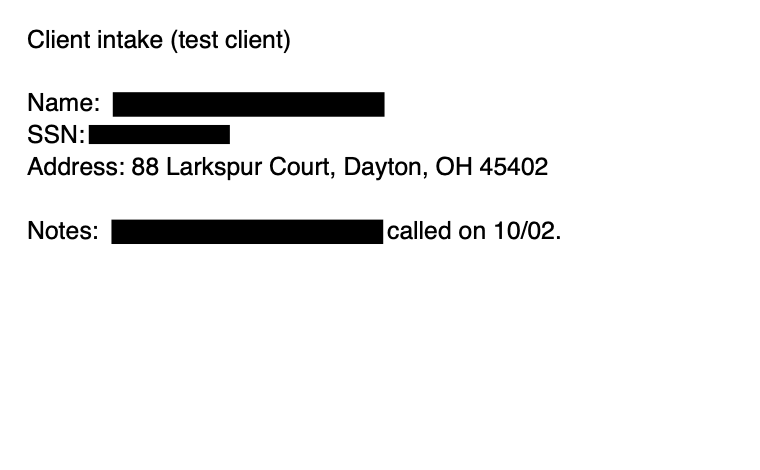
Redacted in Fyllyo: removed from the page, the form field, the comment and the document details.
Anyone who opens Preview’s copy can still read the name in the form field, in the comments list and in the file’s info. The SSN shows in the document’s subject. None of it takes special tools.
Check it yourself
Download the three files and open each one in any PDF app. Look at the form field, the comments list and the document properties.
Everything in them is test data: the name, SSN and address are made up. You’re welcome to use the files and this result, with a link back to this page.
How to redact a PDF safely on a Mac
- Redact the page. Black out the text you need gone.
- Check the rest of the file. Clear any form fields, delete comments that mention it, and clear the title, author, subject and keywords.
- Save a new copy. Earlier saved versions inside a PDF can still hold the old text.
Fyllyo’s Find and redact does all three, for free. It finds names and numbers and removes them, along with any comments, links and fields under the mark. It checks six more places in the file and saves a separate redacted copy. Remove hidden data clears what’s left, such as document details and earlier versions.