Skip to content

GOVERNMENT FORMS · Florida Supreme Court · BUILT IN

Fill the Notice of Confidential Information with AIFlorida Rule 2.420 notice for court filings

Add the filing instructions, the document being filed, the docket and the service record. Fyllyo fills Florida’s Notice of Confidential Information Within Court Filing on your Mac. Anything that doesn’t apply is shown to you, with what the documents said.

Official page from the Florida Supreme Court.

Where AI form filling goes wrong on Notice of Confidential Information within Court Filing

Most of this notice is copying a caption and a document title. The trouble starts where the documents describe more than one filing, more than one date and more than one version of who was served. These are the common places AI tools and autofill get it wrong. What the form requires is for the Florida courts to say. Follow its instructions. Florida Supreme Court official page for Notice of Confidential Information within Court Filing.

A new filing or one already on the docket

The notice has one part for a document filed with it and another for a document already filed, as the form says. A docket full of earlier filings and dates can lead software to fill both parts, or the wrong one.

The exact title of the document being filed

The docket lists the motion the exhibit belongs to, and the notice has a title of its own. Software can fill a neighboring docket entry or the notice’s own title instead of the document it accompanies.

Whole document or specific passages

Whether the whole document is confidential or only parts of it is the filer’s designation. Software can guess it from the type of document, or mark both answers.

The caption, when the filer is the Respondent

The person filing the notice is often not the Petitioner, and the papers carry a firm matter number and a portal envelope number next to the case number. Software can put the client in the Petitioner box or copy the wrong number.

Who signs the certificate, and their office

The service record names a paralegal who prepared it, the client’s home address and an old office address. Software can fill the wrong person’s details, or drop the leading zero of a Bar number.

The service date that actually happened

A service record can hold a proposed date that was canceled and the date service was made. Software can take the first date it sees, and the form wants the month written out and two digits after a printed “20”.

Naming someone whose identity is confidential

The certificate of service lists who was served. Drafts can name a protected person and give her home address, and software can copy the first wording it finds or write its own list.

How Fyllyo takes care of them

With a test client and five documents (a filing instructions memo, the exhibit being filed, a docket excerpt, the service record and the client intake), Fyllyo filled 14 fields in 9 seconds. It kept a date from the part that doesn’t apply off the form and showed the preparer what it found.

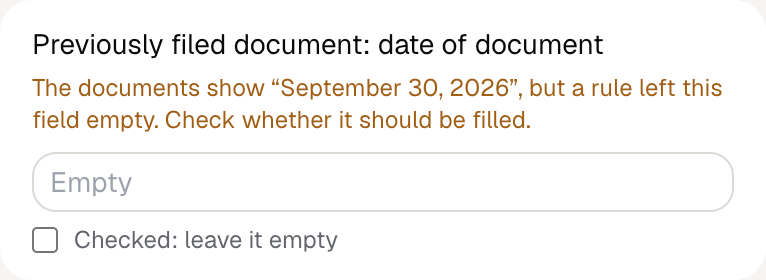
Fyllyo's review of a test Florida Notice of Confidential Information: the previously filed document's date left empty, with the note that the documents show September 30, 2026 but a rule left the field empty.
  • A new filing or one already on the docket. Picks the part from what the filing instructions say this notice is for and leaves the other part empty. A date it found for the part that doesn’t apply is shown to you, not filed.
  • The exact title of the document being filed. Reads the title of the document the instructions name, exhibit letter included.
  • Whole document or specific passages. Ticks “entire document” only when the instructions or the document’s own designation say so, never from the document type.
  • The caption, when the filer is the Respondent. Copies the parties as the caption shows them, and fills the case number only when it sits next to a case-number label.
  • Who signs the certificate, and their office. Fills the attorney who certifies service with her current office address, phone and email, and keeps the Florida Bar number exactly as written.
  • The service date that actually happened. Reads only the completed service date, writes the month as a word, and fills the two digits after “20”.
  • Naming someone whose identity is confidential. Copies the recipient wording approved for public use, and doesn’t put the protected person’s name or address back in.

How much of a Notice of Confidential Information within Court Filing does Fyllyo fill?

Fyllyo can fill all 22 fields on Notice of Confidential Information within Court Filing from the client’s documents. Lines the documents don’t support stay blank and are listed for you to check.

You confirm on every form

  • Plaintiff/Petitioner
  • Defendant/Respondent

What do you give Fyllyo?

Fyllyo reads the documents you already have. These can be PDFs, scans, photos, Word files or typed notes, and you can add several at once. Fyllyo works out which document answers which line.

Filling this form for clients? Compare AI form fillers for law firms.

Client data stays on your Mac

Client documents and the filled form never leave your computer. Fyllyo uploads nothing. Once it is set up, filling works offline.

What Fyllyo doesn’t do

Fyllyo doesn’t decide what to file, give legal or tax advice, or submit Notice of Confidential Information within Court Filing for you. Use the Florida Supreme Court’s official page for Notice of Confidential Information within Court Filing and your professional judgement. Fyllyo does the reading and the typing.

What if a document is a scan or a photo?

Fyllyo reads scans and photos as well as PDFs, Word files and typed notes. Clear, readable copies give the best results, and every answer on Notice of Confidential Information within Court Filing still shows the line it came from.

Fill your next Notice of Confidential Information within Court Filing on your Mac

Try form filling free for 5 days. Then buy Fyllyo Paid once for $99. It is a lifetime licence with free updates and no subscription. Filling forms on your Mac uses no AI credits. Pricing and licence details.