 fyllyo
AI form fillers for law firms: where client files go
Seven of the eight AI form fillers law firms use run in the cloud, so client files go to the vendor’s servers. Fyllyo reads the client’s documents and fills the form on your Mac, and nothing is uploaded, for $99 once. Prices and hosting are from each vendor’s site, November 1, 2026.
Which AI form fillers do law firms use?
| Tool | What you give it | Where client files go | What you get back | Price |
|---|---|---|---|---|
| Fyllyo | The client’s documents | Read on your Mac. Nothing is uploaded. | The filled PDF, each answer shown with the document line it came from | $99 once, for one Mac |
| Instafill | Uploaded documents and profiles: PDF, Word, spreadsheets, images, text | Its servers on Microsoft Azure in Texas | A filled PDF or Word file | From $99 a month for 50 documents |
| Aion | Uploaded documents: passports, prior filings, I-94s, a folder or a .zip | AWS and Render data centers in Virginia, read by Anthropic’s Claude | A filled PDF, for any of 28 USCIS forms | Contact sales (web app in beta) |
| Parley | Uploaded documents: passports, I-94s, I-797 receipts, diplomas, job offers | Its cloud web app | A USCIS-ready PDF packet for the I-129, I-140, I-907 and G-28 | $500 a month for up to 10 seats |
| Docketwise | A client questionnaire, plus uploaded IDs such as passports and I-94s | Its cloud, stored on AWS | USCIS forms, with e-filing on the Pro plan | From $80 per user a month, billed yearly |
| eImmigration | Client questionnaires; its Extractor reads passports, intake forms and USCIS receipts | Its cloud on Microsoft Azure | More than 300 immigration forms, in ready-to-file packets | From $55 per user a month, billed yearly |
| Filevine ImmigrationAI | Case information and client documents, with optional questionnaires | AWS, Microsoft Azure and Google Cloud | USCIS forms, passed on to the USCIS website | Not published |
| Gavel | A questionnaire you build, answered by your staff or the client | Its cloud on AWS | Court and government PDFs | From $83 a month, billed yearly |
Pick Fyllyo if you fill forms from client documents and want those files to stay on your Mac. Pick Docketwise, eImmigration or Filevine if you want the whole immigration case in one cloud system, from questionnaire to filing. Pick Instafill or Parley if uploading is fine and you want a web app that reads documents.
Which AI tools fill forms from the client’s own documents?
Four of the eight fill the form straight from the documents you upload: Fyllyo, Instafill, Aion and Parley. You give them passports, notices and statements, and they fill the form.
Docketwise and eImmigration start from a client questionnaire. Their AI reads documents such as passports, I-94s (Docketwise) and USCIS receipts (eImmigration) into the case, and the forms fill from there. Filevine uses the case information and documents already in Filevine. Gavel fills forms from a questionnaire you build, and says its AI works “without accessing any client data”.
The difference shows up on forms built from many documents. Forms like the I-864 draw on several documents for each client, and a tool that reads them saves typing them into a questionnaire first.
Where do client files go in each AI form filler?
To the vendor’s cloud, in every tool except Fyllyo. Here is what each one says on its own site:
- Instafill: hosted on Microsoft Azure in San Antonio, Texas. Its security page says temporary data is deleted within 2 business days, and that customer data isn’t used to train AI models.
- Aion: client documents stay in AWS and Render data centers in Virginia and are read by Anthropic’s Claude. Originals are deleted after extraction and everything else within 24 hours. It says it has no SOC 2 or ISO 27001 certification.
- Parley: lists SOC 2 Type II, zero data retention and no AI model training.
- Filevine: runs on AWS, Microsoft Azure and Google Cloud, with SOC 2 Type I and II reports.
- Docketwise and Gavel: store data on AWS, encrypted with AES-256.
- eImmigration: runs on Microsoft Azure.
- Fyllyo: reads the client’s documents and fills the form on your Mac. Nothing is uploaded. Built-in forms, such as the I-864, are ready to use. Adding a blank form of your own sends only that blank form and your setup notes to Fyllyo Cloud, never client documents.
The American Bar Association’s Formal Opinion 512, issued July 29, 2024, covers lawyers’ duties when they use generative AI tools, including keeping client information confidential. Read it, and your state bar’s guidance, for what applies to your practice.
How does Fyllyo fill an I-864 from client documents?
You add the client’s documents, pick Form I-864 and press fill. In a recorded run for a test client, Fyllyo filled 60 fields in 19 seconds on a Mac. Every answer sits next to the line of the document it came from, so you check it before you save.
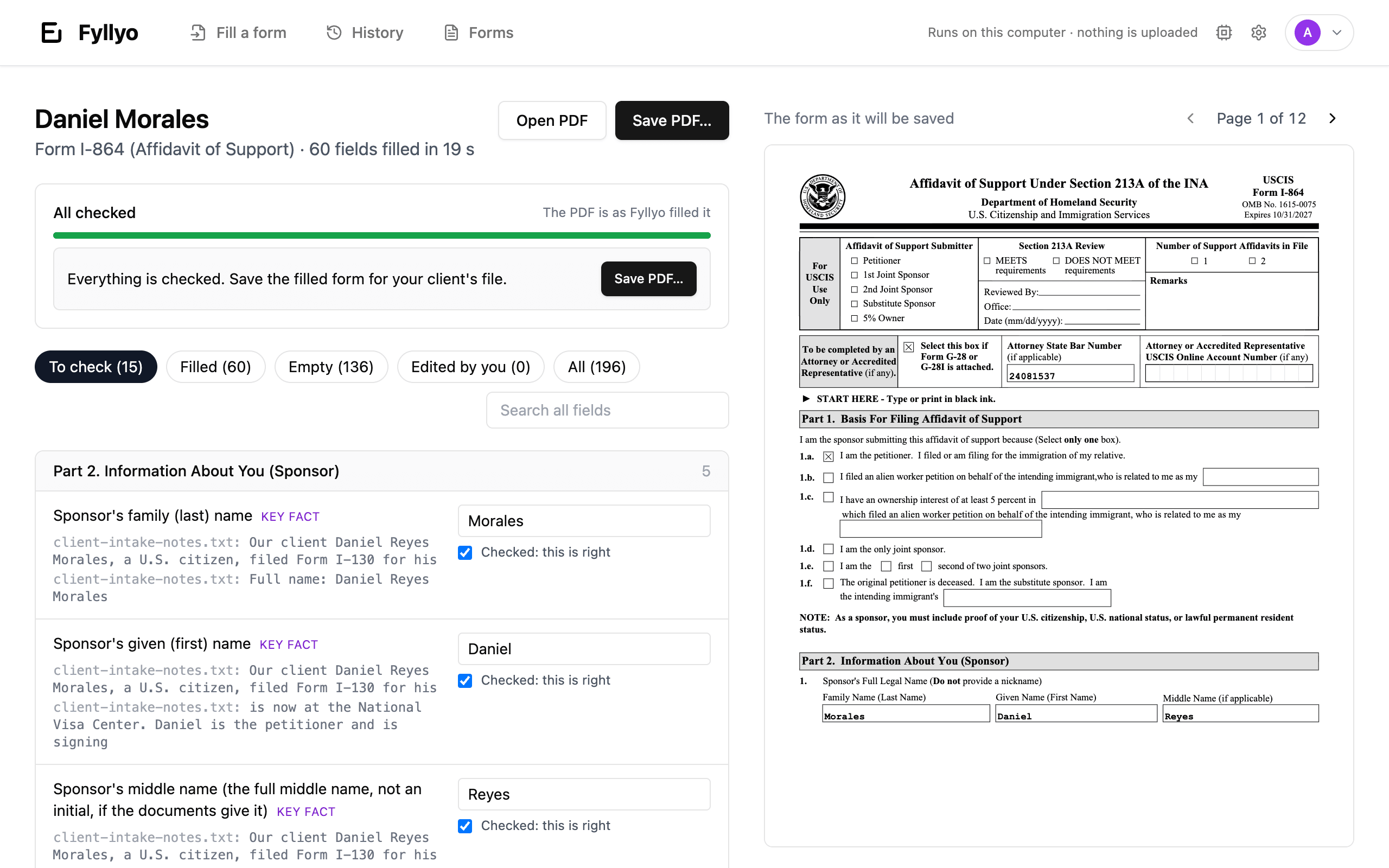
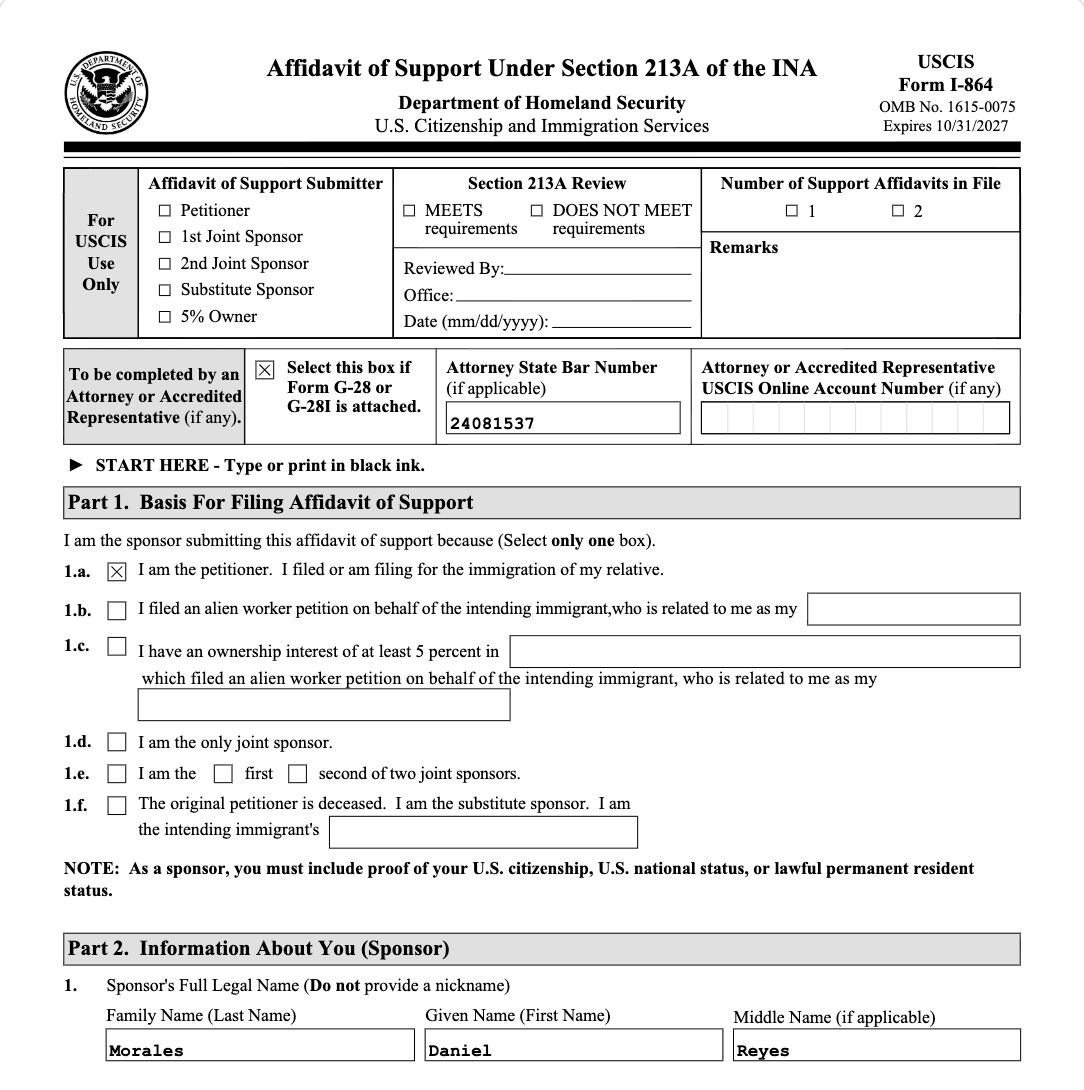
The form library also has the I-130, I-765, N-400 and more. See the I-864 run step by step.
Which AI form filler fits a small law firm?
- Client files must stay in the office: Fyllyo. Filling runs on your Mac, for $99 once.
- You want questionnaires, forms and filing steps in one cloud system: Docketwise (e-filing on Pro), eImmigration or Filevine, priced per user or by quote.
- You fill many kinds of PDFs and uploading is fine: Instafill, from $99 a month.
- Your firm files employment petitions in packets: Parley, from $500 a month for up to 10 seats.
- You build questionnaires for court and government PDFs: Gavel, from $83 a month.
Fyllyo also works next to a case-management system. Keep your cases where they are, and fill the forms that need client documents on the Mac.
Common questions
Does Fyllyo work on Windows?
No. Fyllyo runs on Apple silicon Macs, M1 or later, with macOS 13 or later.
Does Fyllyo file forms with USCIS?
No. It fills the PDF and you save it. You file it the way you do today.
Can Fyllyo fill a form that isn’t in the library?
Yes, if it’s a fillable PDF. Set it up once with credits, then fill it for every client without more credits. See how setup works.
Is there a trial?
Yes. Five days, with no credit card. See pricing.
Sources
We read each vendor’s own pages on November 1, 2026. We didn’t sign up for or test the other tools. Prices are as published that day.