 fyllyo
AutoFill PDF forms on Mac: what it fills, and what it can’t
Apple says that on macOS 14.2 or later, Preview can AutoFill a PDF form with names, addresses and other contact details from the Contacts app. AutoFill fills only from Contacts, so anything that isn’t a contact detail, such as income, dates of employment or case numbers, stays empty. To fill those from your documents, you need an app that reads them, such as Fyllyo, which does it on your Mac.
What AutoFill fills, and what it doesn’t
| Part of the form | Preview AutoFill | Fyllyo, from your documents |
|---|---|---|
| Your name, address and contact details | Yes, from your card in Contacts | Yes, from your documents |
| Someone else’s contact details | Yes, if they’re in your Contacts | Yes, from their documents |
| Income, amounts and employers | No. They aren’t in Contacts. | Yes, from pay stubs, tax forms and returns |
| Case, account and receipt numbers | No | Yes, from the letters and notices that carry them |
| Totals the form works out | No. Preview doesn’t run a form’s scripts (our test). | Yes. The form’s own scripts run. |
| Where it runs | On your Mac | On your Mac |
| Cost | Free, built into macOS | $99 once for AI filling. Filling by hand is free. |
How do I use AutoFill in Preview?
Apple describes it like this, for macOS 14.2 or later:
- Set up your own card in Contacts first. Apple calls it My Card.
- Open the PDF form in Preview.
- Click the AutoFill Form button above the PDF, or click a field in the form.
- Click your name in the menu that appears. Matching details from your card in Contacts go into the form.
- To use someone else’s details, click Choose Other, click their name, then click the detail you want.
Apple also says that not all PDFs support this. If the form has no fields to fill, see why you can’t type in it, and the fix.
When isn’t AutoFill enough?
AutoFill only knows what’s in Contacts. That covers the first lines of most forms. But tax, immigration and court forms ask for much more: amounts from pay stubs, figures from last year’s return, dates and case numbers from letters. AutoFill can’t read those documents, so you still type the rest yourself.
And when you type the rest in Preview, the form’s own scripts don’t run. Totals stay empty and, in our test, saving deleted the scripts from the file.
How do I fill a form from my documents instead?
Fyllyo reads the documents you already have, such as pay stubs, tax forms, passports and letters, and fills the form on your Mac. Every answer shows the line it came from, and anything it isn’t sure of stays empty with the reason. Nothing is uploaded.
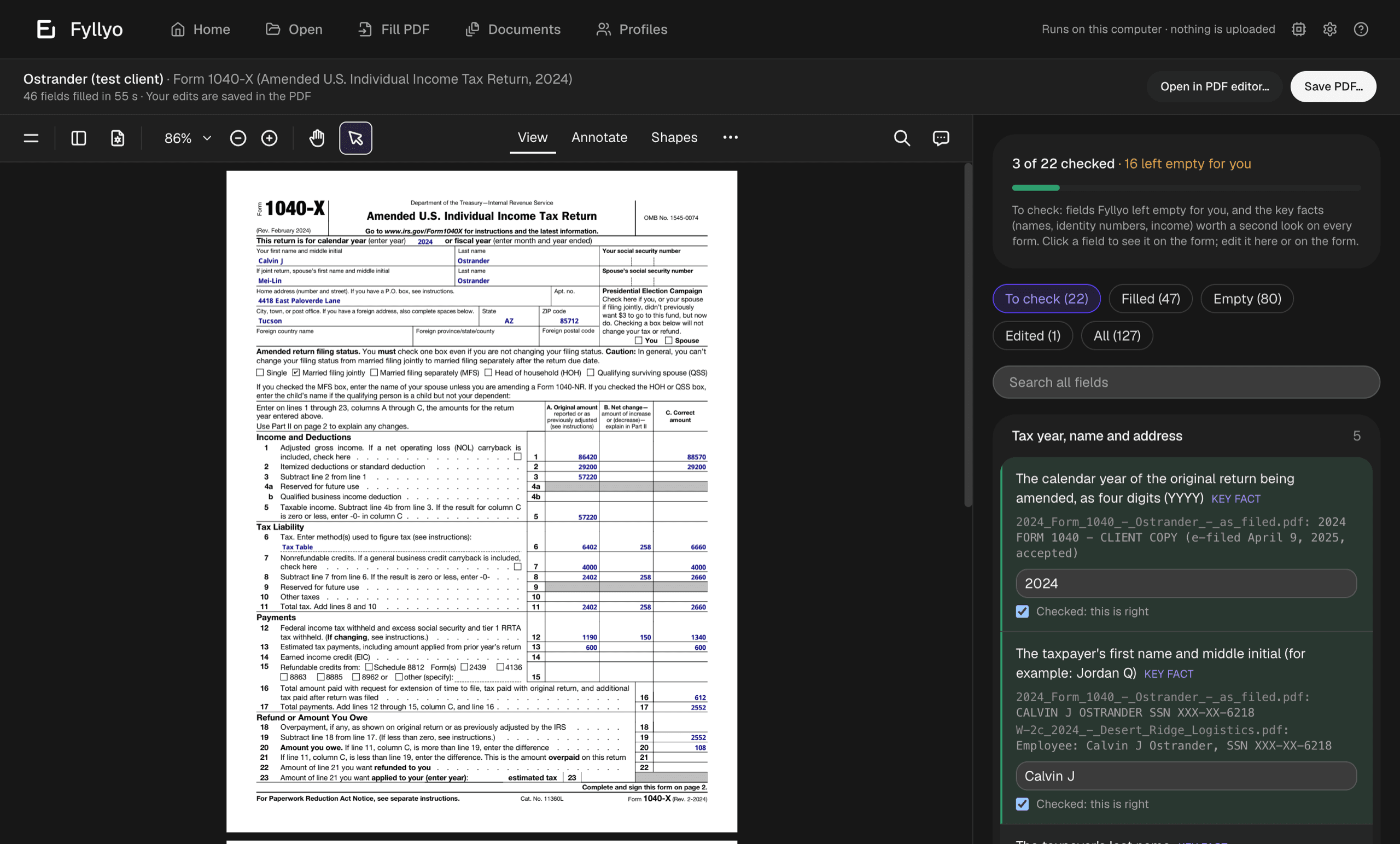
In our recorded runs, Fyllyo filled 2,173 fields across 55 forms, in a median of 19 seconds per form. See every recorded run.
Sources
- Apple: Fill out and sign PDF forms in Preview on Mac (the macOS 26 version of the page), checked October 25, 2026
- Our tests: what Preview does to PDF forms (October 23, 2026, macOS 26.2) and the recorded form-filling runs