Skip to content

GOVERNMENT FORMS · NY courts · BUILT IN

Fill Form UCS-840C with AIRequest for Judicial Intervention Commercial Division Addendum

Add the complaint, the answer and the filing receipt. Fyllyo fills the UCS-840C on your Mac. Anything it can’t confirm is left for you, with the reason.

Official form and instructions from the NY courts.

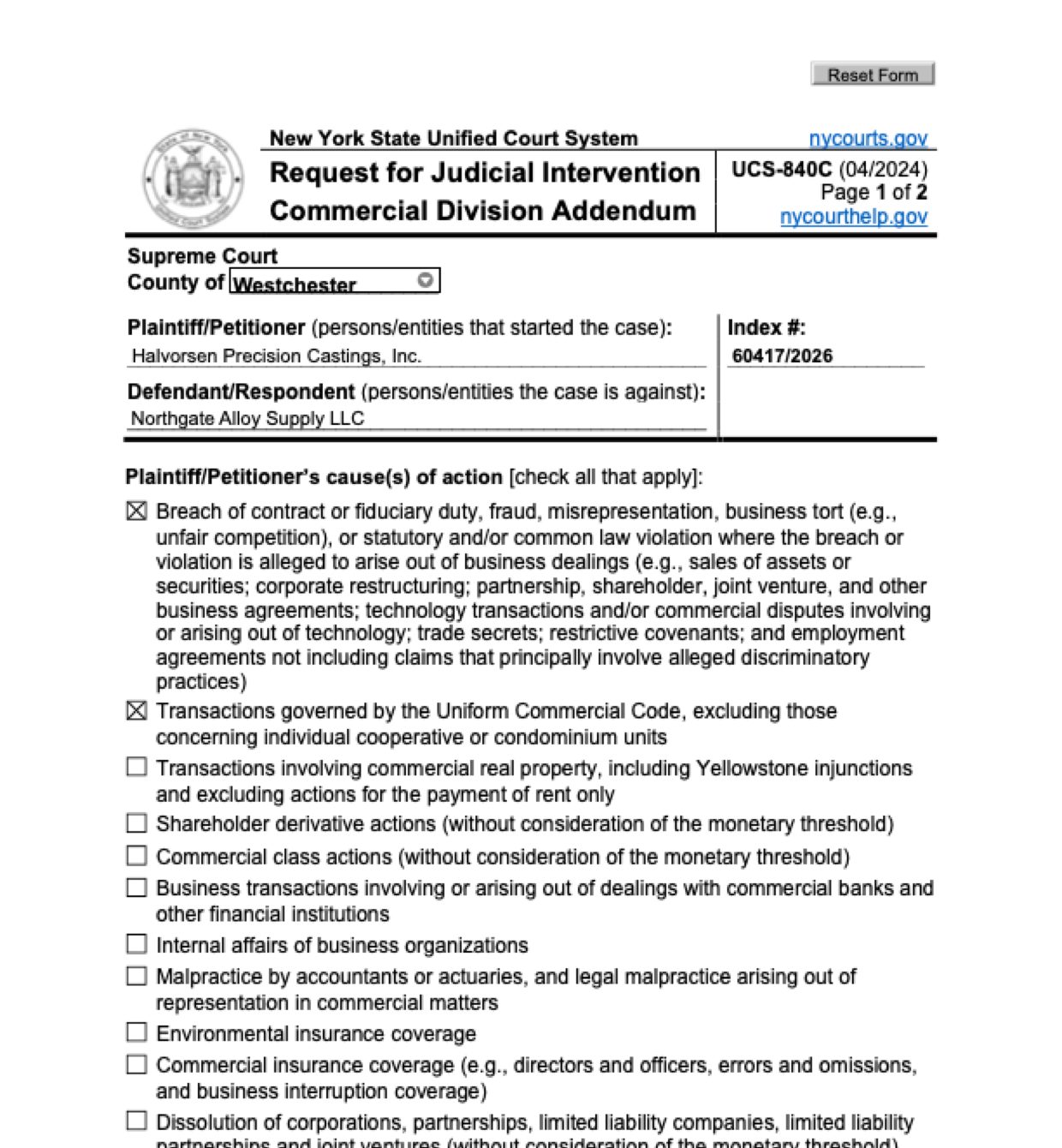
Page 1 of Form UCS-840C as Fyllyo filled it for a test client in a recorded run.
Page 1 of Form UCS-840C, as Fyllyo filled it for a test client

Where AI form filling goes wrong on Form UCS-840C

The UCS-840C asks for what the pleadings say: which kinds of claims are made, the compensatory damages claimed, the equitable relief asked for, and the counterclaims. Software goes wrong where a case file holds many figures and passages that look like the answer: a grand total with punitive damages in it, a settlement proposal, an affirmative defense, a bank or an insurer in the story. These are the common places AI tools and autofill get it wrong. What the form requires is for the New York State Unified Court System to say. Follow its instructions. NY courts instructions for Form UCS-840C.

Punitive damages and interest added to the compensatory amount

A complaint’s demand for judgment lists compensatory damages, punitive damages, interest, fees and costs, and memos often add them into one “total demand”. Software can copy that total, or the largest dollar figure it sees, into the compensatory damages line.

Two figures for the same damages

A complaint can state one compensatory figure in its text and itemize the damages in a schedule that adds up to a different one. Software usually takes whichever figure it reads first and never notices the other.

Ticking the claim types the complaint pleads

The form lists twelve kinds of claims in long legal wording. Software matching words can miss a box when the complaint names its cause differently, such as breach of warranty for a sale of goods.

A bank, an insurer or an arbitration clause in the story

Case papers mention banks that moved the money, insurers handling a related claim, and contract clauses that send some disputes to arbitration. Software that marks a box whenever a keyword appears can tick categories the case doesn’t plead.

Affirmative defenses copied as counterclaims

An answer has denials, affirmative defenses such as a setoff, and sometimes a counterclaim. Software can copy the defenses or the setoff amount into the counterclaims space, or write its own summary.

The other side’s settlement terms in the relief box

A case file also holds settlement letters, which talk about the same contract and the same goods. Software can fill the plaintiff’s equitable relief with terms from a settlement proposal, or with a summary of its own.

The county where someone lives, not the court’s county

The papers carry many counties: where the parties are based, where the lawyers’ offices are, where a verification was sworn. Software can fill the court’s county from any of them.

How Fyllyo takes care of them

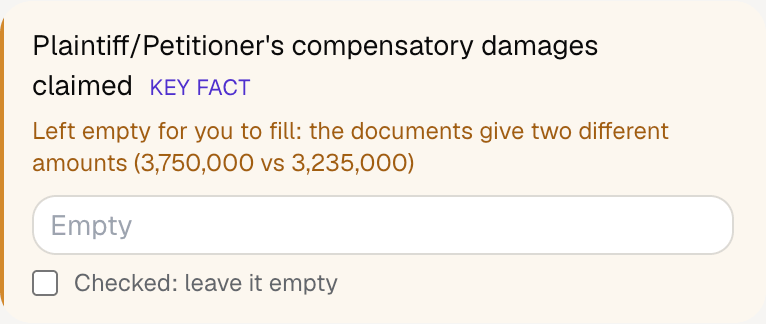
With a test client and five documents (the verified complaint with its damages schedule, the verified answer with a counterclaim, the filing receipt, a settlement letter and a paralegal’s memo), Fyllyo filled 8 fields in 27 seconds. It left the compensatory damages for the preparer, with both amounts.

Fyllyo's review of a test UCS-840C: the plaintiff's compensatory damages left empty with the note that the documents give two different amounts, 3,750,000 and 3,235,000.
  • Punitive damages and interest added to the compensatory amount. Reads only the compensatory amount the pleading states, leaving out punitive damages, interest, costs and fees, as the form’s line says.
  • Two figures for the same damages. Reads the stated total and the itemized amounts, adds up the items and compares. In the test they differed, so the amount was left empty with both figures.
  • Ticking the claim types the complaint pleads. Reads each cause of action once and ticks every category it is pleaded as. In the test, those were a contract claim between businesses and a UCC sale of goods.
  • A bank, an insurer or an arbitration clause in the story. Ticks a category only when a cause of action is about it, so those boxes stayed empty in the test.
  • Affirmative defenses copied as counterclaims. Copies the answer’s counterclaim passage word for word and checks it appears in the papers. Defenses and denials stay out.
  • The other side’s settlement terms in the relief box. Copies the plaintiff’s own request for a declaration or injunction from the pleading, as written, and checks it appears there.
  • The county where someone lives, not the court’s county. Takes the county from the Supreme Court caption, not from a party’s or lawyer’s address.

How much of a Form UCS-840C does Fyllyo fill?

Fyllyo can fill all 21 fields on Form UCS-840C from the client’s documents. Lines the documents don’t support stay blank and are listed for you to check.

You confirm on every form

  • Plaintiff/Petitioner names
  • Defendant/Respondent names
  • Plaintiff/Petitioner's compensatory damages claimed

What do you give Fyllyo?

Fyllyo reads the documents you already have. These can be PDFs, scans, photos, Word files or typed notes, and you can add several at once. Fyllyo works out which document answers which line.

Filling Form UCS-840C for clients? Compare AI form fillers for law firms.

Client data stays on your Mac

Client documents and the filled form never leave your computer. Fyllyo uploads nothing. Once it is set up, filling works offline.

What Fyllyo doesn’t do

Fyllyo doesn’t decide what to file, give legal or tax advice, or submit Form UCS-840C for you. Use the NY courts’s instructions for Form UCS-840C and your professional judgement. Fyllyo does the reading and the typing.

What if a document is a scan or a photo?

Fyllyo reads scans and photos as well as PDFs, Word files and typed notes. Clear, readable copies give the best results, and every answer on Form UCS-840C still shows the line it came from.

Fill your next Form UCS-840C on your Mac

Try form filling free for 5 days. Then buy Fyllyo Paid once for $99. It is a lifetime licence with free updates and no subscription. Filling forms on your Mac uses no AI credits. Pricing and licence details.