Skip to content

GOVERNMENT FORMS · Florida Courts · BUILT IN

Fill Form 12.901(b)(3) with AIPetition for Dissolution of Marriage

Add the intake notes, the marriage record, the clerk’s filing sheet and the latest contact details. Fyllyo fills Florida Form 12.901(b)(3) on your Mac. Anything it can’t settle from the documents is left for you, with the reason.

Fyllyo fills the 02/18 edition. Official page from the Florida Courts.

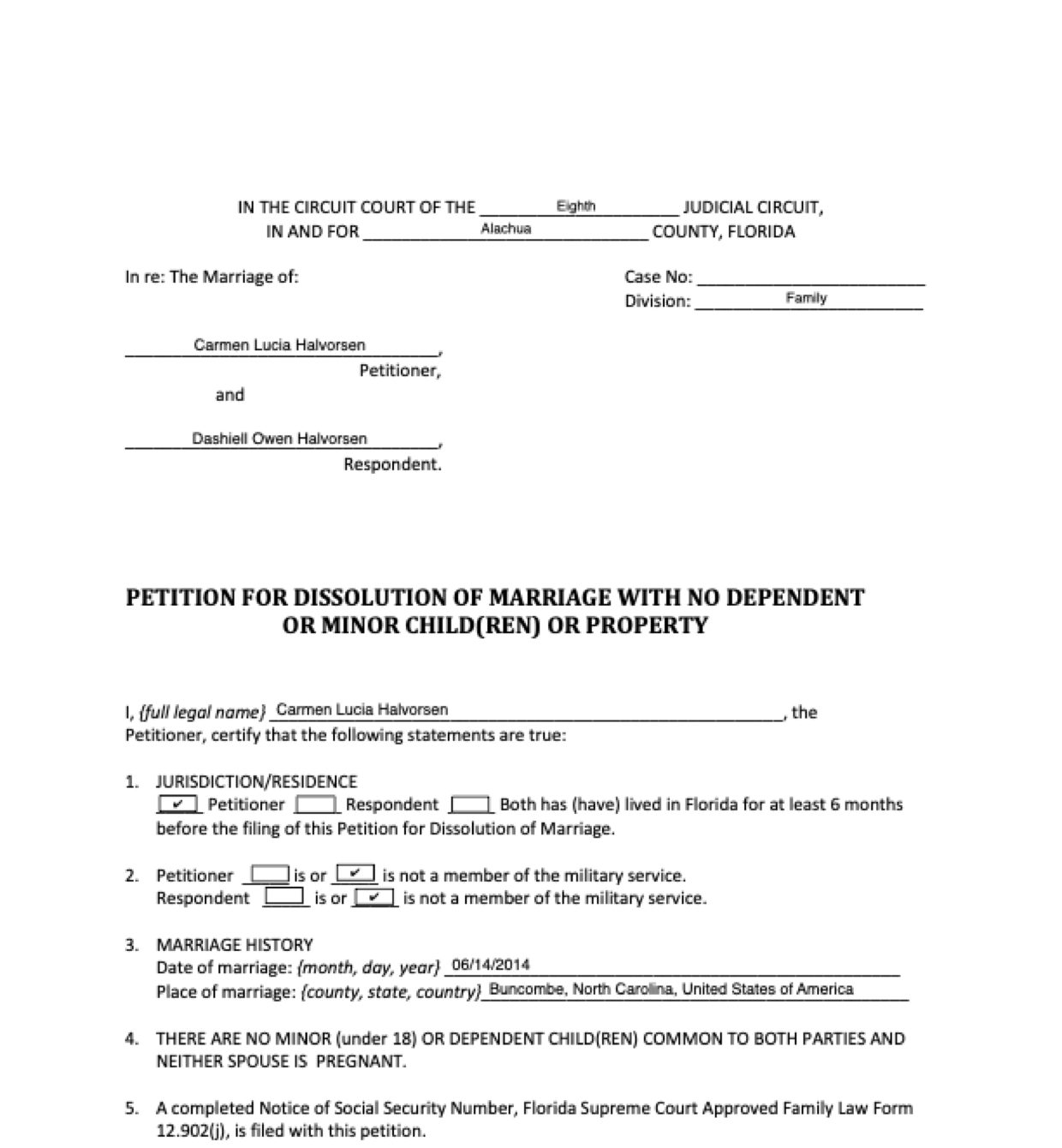
Page 5 of Form 12.901(b)(3) as Fyllyo filled it for a test client in a recorded run.
Page 5 of Form 12.901(b)(3), as Fyllyo filled it for a test client

Where AI form filling goes wrong on Form 12.901(b)(3)

Most of Form 12.901(b)(3) is copying names, dates and addresses. The trouble is that a divorce file holds several versions of them: a marriage record with four dates, notes written before the client changed their mind, an address from before a move. These are the common places AI tools and autofill get it wrong. What the form requires is for the Florida courts to say. Follow their instructions. Florida Courts official page for Form 12.901(b)(3).

A license or receipt number in the case number box

Before filing there is usually no case number yet, but the file is full of numbers that look like one: the marriage license number, the certificate number, a self-help center receipt. Software can fill the first one it finds.

The marriage record’s other dates

A certified marriage record carries the day the license was issued, the wedding day, the day it was recorded and the day the copy was certified. Software can take the wrong one.

Place of marriage in three parts

The form asks for the county, state and country on one line. Records give them on separate lines, next to a chapel, a town and the register’s office. Software can copy the chapel, the office address, or the county where the case is filed.

A spouse who used to live in Florida

Notes often say how long each spouse lived in Florida, including one who has since moved away. Software can tick “Both” from an old residence, or work out a length of time from an address.

Past military service read as current

A spouse who left the service years ago can still sign emails with a rank and “U.S. Navy”. Software can mark that spouse as a member of the military from the signature.

A former name the client decided not to use

The first intake says the client wants a former name back. A later memo says they’ve decided to keep their current name. Software can fill the earlier request, or copy a name just because it’s in the file.

An old address, and a date nobody has signed yet

Intake notes carry the address from before a move, the helper’s disclosure carries a business address, and the memo mentions a planned signing date. Software can copy the old address, put the helper’s details in the signature block, or date the petition before it’s signed.

How Fyllyo takes care of them

With a test client and six documents (intake notes, a certified marriage record, a self-help center filing sheet, an email with new contact details, a final review memo and a nonlawyer’s disclosure), Fyllyo filled 25 fields in 10 seconds, each with the line it came from.

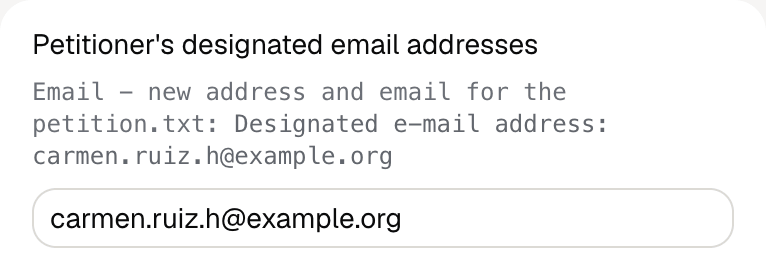
Fyllyo's review of a test Florida Form 12.901(b)(3): the petitioner's designated email address, shown with the line from the client's email that designates it for court papers.
  • A license or receipt number in the case number box. Fills the case number only when a document labels it as one. When none does, the box is left for the clerk.
  • The marriage record’s other dates. Reads only the date of the marriage itself and writes it month, day, year.
  • Place of marriage in three parts. Reads the county, state and country of the marriage and joins them on one line.
  • A spouse who used to live in Florida. Uses only what the documents state about residence, and never works it out from an address or from dates.
  • Past military service read as current. Reads each spouse’s current status from what the documents state, not from a signature or past service.
  • A former name the client decided not to use. Follows the latest instruction and fills the former name only when the documents say it’s requested.
  • An old address, and a date nobody has signed yet. Uses the latest contact details, including the email designated for court papers, keeps the helper in the nonlawyer section, and leaves the date for the day it’s signed.

How much of a Form 12.901(b)(3) does Fyllyo fill?

Fyllyo can fill all 39 fields on Form 12.901(b)(3) from the client’s documents. Lines the documents don’t support stay blank and are listed for you to check.

You confirm on every form

  • Petitioner's name
  • Respondent's name
  • Petitioner's full legal name
  • Petitioner's former full legal name
  • Petitioner's printed name

What do you give Fyllyo?

Fyllyo reads the documents you already have. These can be PDFs, scans, photos, Word files or typed notes, and you can add several at once. Fyllyo works out which document answers which line.

Filling Form 12.901(b)(3) for clients? Compare AI form fillers for law firms.

Client data stays on your Mac

Client documents and the filled form never leave your computer. Fyllyo uploads nothing. Once it is set up, filling works offline.

What Fyllyo doesn’t do

Fyllyo doesn’t decide what to file, give legal or tax advice, or submit Form 12.901(b)(3) for you. Use the Florida Courts’s official page for Form 12.901(b)(3) and your professional judgement. Fyllyo does the reading and the typing.

Which edition of Form 12.901(b)(3) does Fyllyo fill?

The built-in Form 12.901(b)(3) is the 02/18 edition. For a different edition, add that fillable PDF as your own form. You set it up once, then fill it like this one. Set up that fillable PDF as your own form →

What if a document is a scan or a photo?

Fyllyo reads scans and photos as well as PDFs, Word files and typed notes. Clear, readable copies give the best results, and every answer on Form 12.901(b)(3) still shows the line it came from.

Fill your next Form 12.901(b)(3) on your Mac

Try form filling free for 5 days. Then buy Fyllyo Paid once for $99. It is a lifetime licence with free updates and no subscription. Filling forms on your Mac uses no AI credits. Pricing and licence details.