Skip to content

GOVERNMENT FORMS · NYS Office of State Review · BUILT IN

Fill Form E with AIAffidavit of Personal Service (NYS Office of State Review)

Add the process server’s delivery report, the papers kept for annexing and the notary’s record. Fyllyo fills Form E on your Mac and shows the lines behind each answer for you to check.

Official form and page from the NYS Office of State Review.

Where AI form filling goes wrong on Form E

Form E is one page, but the papers behind it name many people, places and dates. They name the person who hired the server, the one assigned and the one who went. They give the district’s mailing address and the office actually visited, and the day of delivery and the day the affidavit was sworn. Software reading those papers has to keep each one in its place. These are the common places AI tools and autofill get it wrong. What the form requires is for the NYS Education Department’s Office of State Review to say. Follow its instructions. NYS Office of State Review official page for Form E.

The server who was assigned isn’t the one who went

A job file names the lawyer who hired the server, the server dispatch assigned and the server who actually delivered, and the notary signs too. Software can put any of these names on the line for the person serving the papers.

The day of delivery, not the day of the oath

Service papers carry many dates: the dispatch, a failed attempt, the delivery, the report and the oath. Software can take the first date it sees, or the oath date, as the date of service.

One date, three boxes

The delivery report writes the date as 10/14/2026. The form wants the day, the month as a word and the last two digits of the year after a printed “20”. Software can copy the whole date into one box, write “10” for the month, or repeat the century.

The office visited, not the mailing address

A school district’s mailing address is often a P.O. box, its old office can still appear on older papers, and the lawyer’s and parent’s addresses sit in the same file. Software can fill the first address it finds as the place of service.

Two counties on one page

The form asks for two counties: where the affidavit was sworn and where the papers were served. When the server swears in their own county, software can put the same county in both.

The person who took the papers, not the one they were meant for

Papers are addressed to the superintendent but handed to whoever is there, and a receptionist shows the server in. Software can fill the intended recipient’s name and title, or the receptionist’s.

The papers in this delivery, as listed

A service packet cover sheet lists the papers, and emails describe them more loosely. Software can paraphrase the list or copy papers from another delivery.

How Fyllyo takes care of them

With a test client and four documents (the process server’s delivery report, the law firm’s service packet cover sheet, the notary’s jurat memo and the lawyer’s email), Fyllyo filled 13 fields in 5 seconds. Each answer shows the lines it came from.

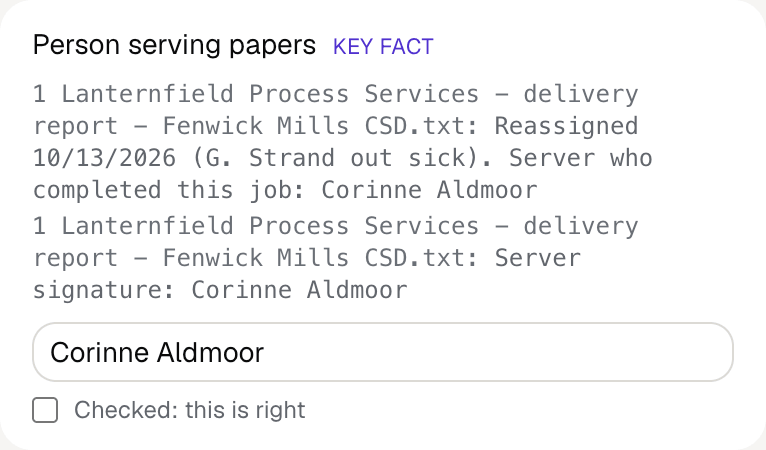
Fyllyo's review of a test Form E: the person serving papers filled as Corinne Aldmoor, shown with the delivery report's lines saying she was reassigned the job and completed it.
  • The server who was assigned isn’t the one who went. Reads the name of the person the completed delivery report says served the papers, not the client, lawyer, notary or a server who was only assigned.
  • The day of delivery, not the day of the oath. Reads only the date of the completed delivery, never an attempt, oath, signature or document date.
  • One date, three boxes. Splits the date itself. The month number becomes the month’s name, and the year becomes its last two digits.
  • The office visited, not the mailing address. Fills the street, town and county where the papers were actually delivered, never a P.O. box, a former office or a client’s or lawyer’s address.
  • Two counties on one page. Reads each county from its own record. The oath county comes from the notary’s record, and the service county from the delivery report.
  • The person who took the papers, not the one they were meant for. Fills the name and title of the person the papers were actually handed to, in both places the form asks for it, and the district served in this case only.
  • The papers in this delivery, as listed. Copies the papers served as the delivery report lists them, and checks the words appear in the documents.

How much of a Form E does Fyllyo fill?

Fyllyo can fill all 13 fields on Form E from the client’s documents. Lines the documents don’t support stay blank and are listed for you to check.

You confirm on every form

  • Person serving papers

What do you give Fyllyo?

Fyllyo reads the documents you already have. These can be PDFs, scans, photos, Word files or typed notes, and you can add several at once. Fyllyo works out which document answers which line.

Filling Form E for clients? Compare AI form fillers for law firms.

Client data stays on your Mac

Client documents and the filled form never leave your computer. Fyllyo uploads nothing. Once it is set up, filling works offline.

What Fyllyo doesn’t do

Fyllyo doesn’t decide what to file, give legal or tax advice, or submit Form E for you. Use the NYS Office of State Review’s official page for Form E and your professional judgement. Fyllyo does the reading and the typing.

What if a document is a scan or a photo?

Fyllyo reads scans and photos as well as PDFs, Word files and typed notes. Clear, readable copies give the best results, and every answer on Form E still shows the line it came from.

Fill your next Form E on your Mac

Try form filling free for 5 days. Then buy Fyllyo Paid once for $99. It is a lifetime licence with free updates and no subscription. Filling forms on your Mac uses no AI credits. Pricing and licence details.