Skip to content

GOVERNMENT FORMS · Appellate Division, First Department · BUILT IN

Fill the Poor Person Relief Motion with AINotice of Motion for Poor Person Relief and Transcript (NY Appellate Division, First Department)

Add the intake notes, the order being appealed, the motion calendar notice and the service record. Fyllyo fills the 2024 Motion for Poor Person Relief on your Mac and shows the lines behind each answer for you to check.

Official form and instructions from the Appellate Division, First Department.

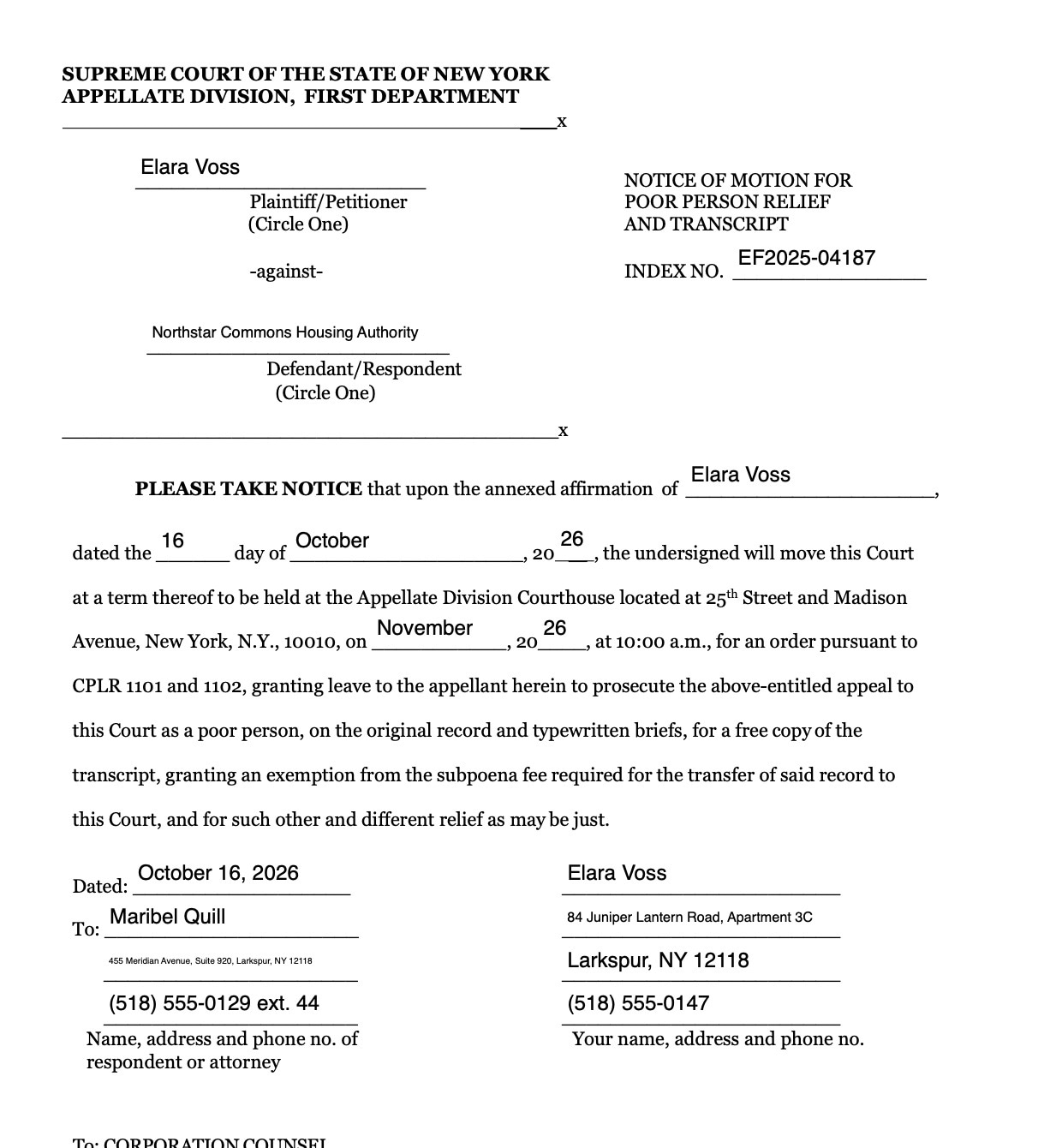
Page 2 of Motion for Poor Person Relief as Fyllyo filled it for a test client in a recorded run.
Page 2 of Motion for Poor Person Relief, as Fyllyo filled it for a test client

Where AI form filling goes wrong on Motion for Poor Person Relief

The 2024 motion is three papers in one: the notice of motion, the appellant’s affirmation and the affirmation of service. Each asks for names, addresses and dates, and the case file holds several of each: the appellant’s old and new homes, the other side’s office and its lawyer’s, the court clerk’s office and the server’s home. These are the common places AI tools and autofill get it wrong. What the form requires is for the New York State Unified Court System to say. Follow its instructions. Appellate Division, First Department instructions for Motion for Poor Person Relief.

The other side, or its lawyer

The notice of motion goes to the respondent or its attorney. The file names both, with the respondent’s office, the law firm’s suite, a main fax line and a direct extension. Software can address the notice to the party, or mix the firm’s fax with the lawyer’s address.

The clerk’s office isn’t a party

The order being appealed prints the court clerk’s address and phone number. Software can take them as the respondent’s, or as the appellant’s.

An address the appellant left

Intake notes keep the appellant’s prior address next to the current one. Software can put the old home in the notice’s contact block or in the affirmation.

Who was served, and where

The affirmation of service names the person who mailed the papers and the party they were mailed to, and the file has other addresses for both sides. Software can repeat the lawyer from the notice, or put the server’s home where the party’s goes.

Dates after a printed “20”

The notice, the return date and both affirmations each print “20” before the year, and some split the day and month into separate blanks. Software can write the full year after the “20”, or take the order’s date or the calendar notice’s date instead.

Income and assets in the appellant’s own words

The file holds the appellant’s own statement of benefits, wages, rent and savings, and a W-2 total for last year. Software can work out income from the W-2, or summarize the statement.

Numbers that aren’t the index

The papers carry a postal receipt number, a masked Social Security number and phone numbers next to the index number. Software can put any of them in the index box.

How Fyllyo takes care of them

With a test client and four documents (the intake notes, the order being appealed, the motion calendar notice naming the respondent’s lawyer, and the record of service by mail), Fyllyo filled 39 fields in 12 seconds. Every field it filled matched the test client’s answers.

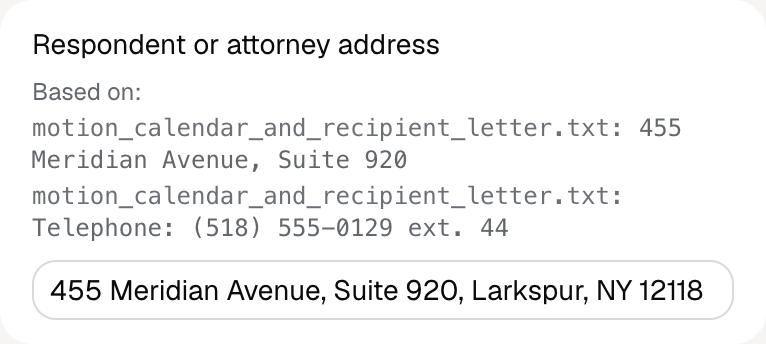
Fyllyo's review of a test Motion for Poor Person Relief: the respondent's attorney's address filled as 455 Meridian Avenue, Suite 920, Larkspur, NY 12118, shown with the address and telephone lines from the motion calendar notice.
  • The other side, or its lawyer. Addresses the notice to the lawyer the papers name for it, at that lawyer’s address and phone. In the test, Maribel Quill at 455 Meridian Avenue, extension 44 went in, and the fax and the housing authority’s office stayed off.
  • The clerk’s office isn’t a party. Leaves the clerk’s details off the form. In the test, the clerk’s office on Justice Plaza never reached it.
  • An address the appellant left. Fills the current home in both places. In the test, 84 Juniper Lantern Road went in, and the apartment replaced in May 2026 stayed off.
  • Who was served, and where. Fills each part from the service record: the server’s name and home, then the party served at the address it was mailed to.
  • Dates after a printed “20”. Writes the day, the month and the last two digits in their own blanks. In the test, the notice is dated 16 October and returnable November 23, each with “26” after the printed “20”.
  • Income and assets in the appellant’s own words. Copies the appellant’s statement as written, amounts and periods included. In the test, the W-2 figure never reached the form.
  • Numbers that aren’t the index. Fills the index number from the line that names it. In the test, EF2025-04187 went in on both captions, and the postal receipt number stayed off.

How much of a Motion for Poor Person Relief does Fyllyo fill?

Fyllyo fills 40 of the 41 fields on Motion for Poor Person Relief from the client’s documents. Lines the documents don’t support stay blank and are listed for you to check.

You do

  • Applicant's signature

You confirm on every form

  • Moving appellant's name
  • Appellant's name

What do you give Fyllyo?

Fyllyo reads the documents you already have. These can be PDFs, scans, photos, Word files or typed notes, and you can add several at once. Fyllyo works out which document answers which line.

Filling this form for clients? Compare AI form fillers for law firms.

Client data stays on your Mac

Client documents and the filled form never leave your computer. Fyllyo uploads nothing. Once it is set up, filling works offline.

What Fyllyo doesn’t do

Fyllyo doesn’t decide what to file, give legal or tax advice, or submit Motion for Poor Person Relief for you. Use the Appellate Division, First Department’s instructions for Motion for Poor Person Relief and your professional judgement. Fyllyo does the reading and the typing.

What if a document is a scan or a photo?

Fyllyo reads scans and photos as well as PDFs, Word files and typed notes. Clear, readable copies give the best results, and every answer on Motion for Poor Person Relief still shows the line it came from.

Fill your next Motion for Poor Person Relief on your Mac

Try form filling free for 5 days. Then buy Fyllyo Paid once for $99. It is a lifetime licence with free updates and no subscription. Filling forms on your Mac uses no AI credits. Pricing and licence details.